

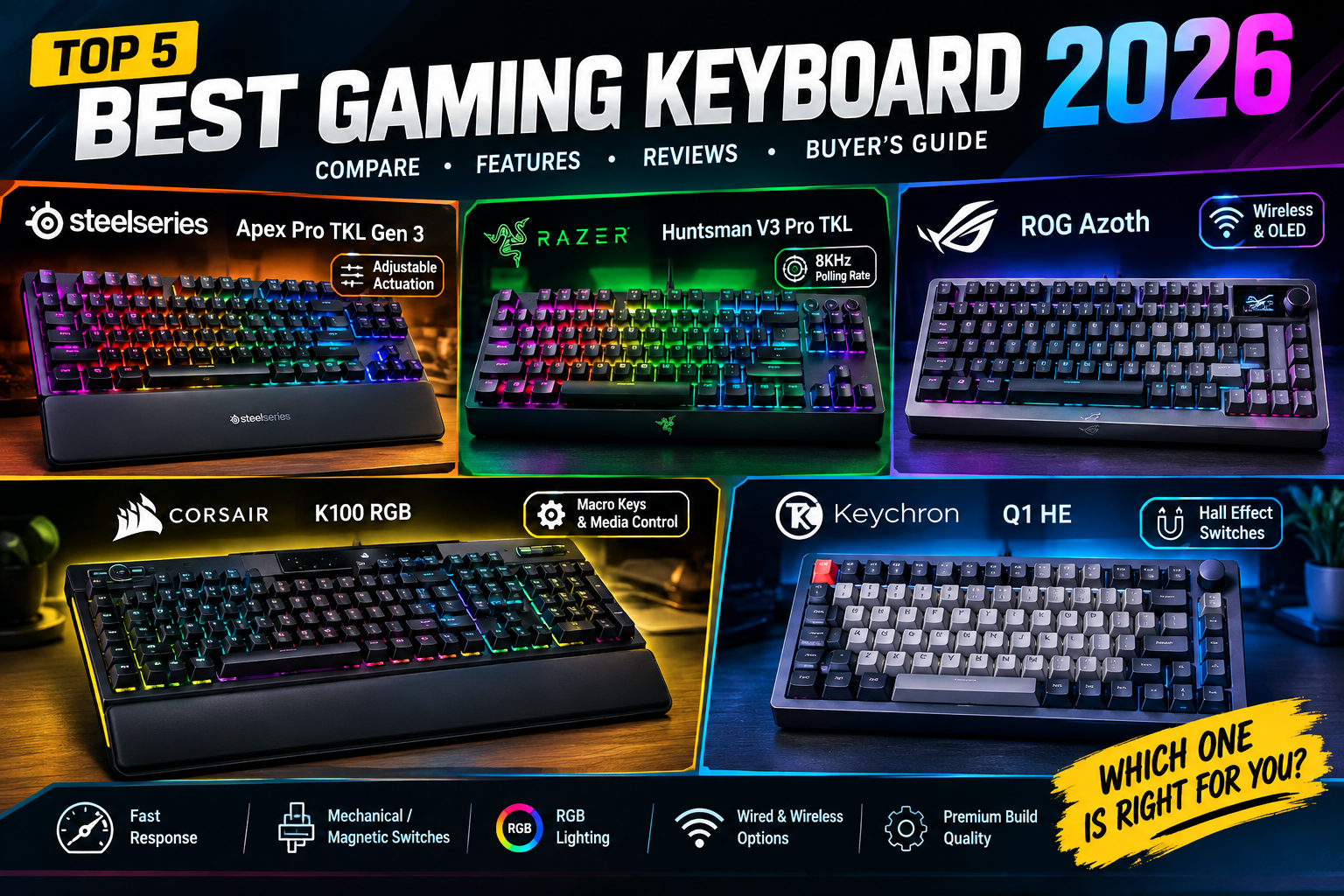
Best Gaming Keyboard 2026: 5 Premium Reviewed
What should you look for when buying a premium gaming keyboard?
The answer depends heavily on the games you play.
For competitive FPS players, switch response and adjustable actuation can matter more than dedicated media controls. For MMO players, programmable macros and a full-size layout may be more useful. Meanwhile, someone who works during the day and games at night might care equally about wireless connectivity, typing comfort, sound, and appearance.
Hall-effect switches are one of the biggest changes
Traditional mechanical switches rely on physical electrical contacts. Hall-effect keyboards use magnetic sensing instead. That allows manufacturers to measure key travel continuously rather than simply determining whether a switch has crossed a fixed activation point.
Why does that matter?
Because it enables features such as adjustable actuation and Rapid Trigger.
The SteelSeries Apex Pro TKL Gen 3, for example, uses OmniPoint 3.0 magnetic switches with adjustable actuation. Current customer feedback specifically praises the ability to set actuation from very shallow to deeper levels.
Razer takes a similar approach with its Huntsman V3 Pro range. The latest 8KHz model uses analog optical switches with adjustable actuation, Rapid Trigger, Snap Tap, and other competitive functions.
Meanwhile, RTINGS currently places the Wooting 80HE at the top of its overall gaming-keyboard recommendations, showing just how influential magnetic-switch technology has become.
But here’s the catch: not every gamer needs Hall-effect technology.
If you’re mostly playing RPGs, strategy games, simulators, or casual multiplayer titles, the difference may be less important than switch feel, layout, wireless convenience, and build quality.
That’s why the five choices below aren’t simply ranked by polling rate.
Quick Shopping Tips
1. Choose the right layout
A full-size board gives you a numpad and plenty of dedicated controls. That’s great for productivity and MMO gaming, but it consumes valuable desk space.
A TKL keyboard removes the numpad while keeping the function row and navigation cluster. For many gamers, this is the sweet spot.
A 75% keyboard compresses the layout further while retaining many important keys.
For FPS players, TKL and 75% designs can also leave more room for a large mouse movement area.
2. Don’t obsess over 8,000Hz polling
An 8KHz polling rate sounds spectacular—and it can contribute to extremely low input latency.
However, it isn’t a magic button.
A competitive gamer can benefit from an exceptionally responsive keyboard, but the difference between an excellent 1,000Hz keyboard and an 8,000Hz model won’t suddenly turn an average player into an esports champion.
As PC Gamer’s 2026 roundup emphasizes, performance, feel, and value all matter when evaluating these boards.
3. Think about switch feel
Linear switches are generally smooth from top to bottom and are popular for gaming.
Clicky switches provide a pronounced click and tactile feedback but can be noisy.
Tactile switches provide a noticeable bump without the loud click.
Magnetic switches add another layer because you can often adjust where the key activates.
4. Don’t underestimate software
Here’s an easy-to-overlook point: a fantastic keyboard with awful software can become frustrating.
Wooting’s Wootility software is one reason its boards receive such strong reviews. RTINGS specifically praises its robust configuration experience.
SteelSeries GG, Razer Synapse, ASUS Armoury Crate, Corsair iCUE, and Keychron’s software ecosystems all take different approaches.
5. Check wired versus wireless carefully
Wireless is convenient, particularly if you have a clean desk setup.
Nevertheless, serious competitive players often still prefer wired connections because they’re simple, consistent, and don’t require battery management.
The ASUS ROG Azoth is particularly interesting because it offers multiple connection modes, whereas the Razer Huntsman V3 Pro TKL is designed primarily as a wired competitive board.
1. SteelSeries Apex Pro TKL Gen 3 — Best Overall for Most Competitive Gamers
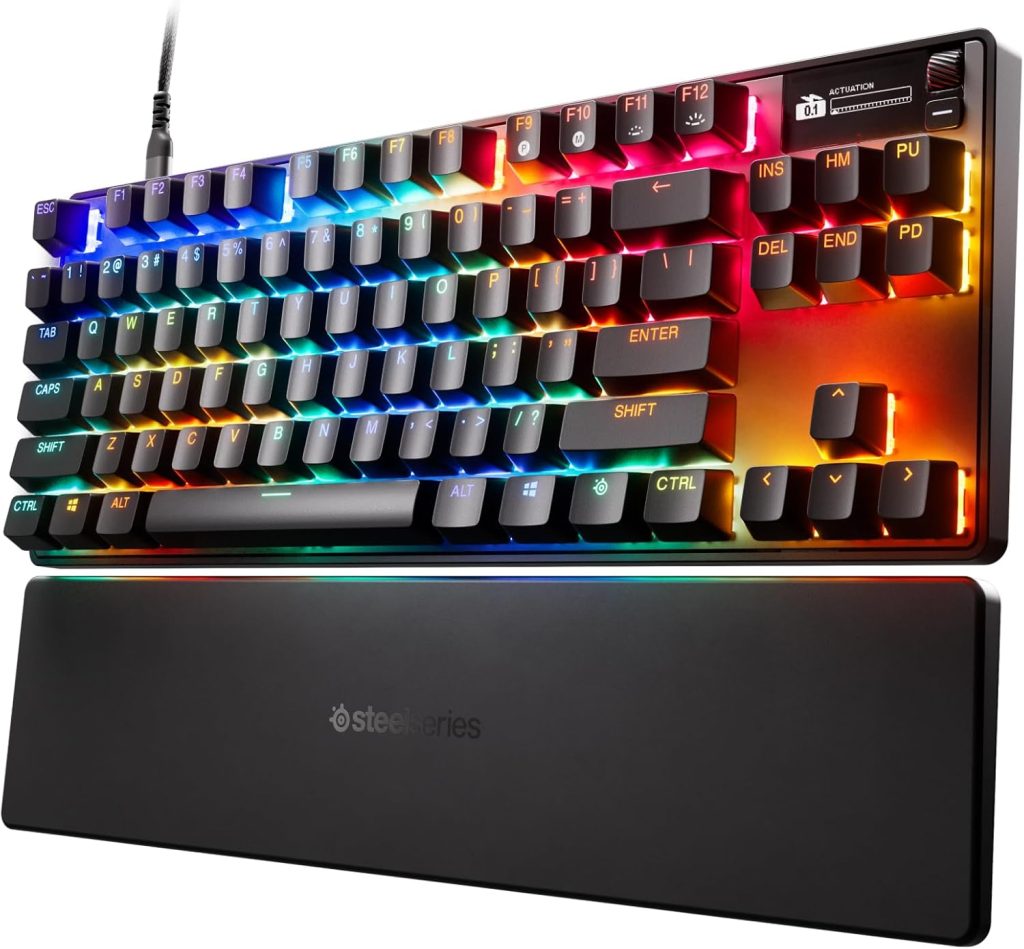
Typical 2026 price: $160–$240
Amazon-linked rating snapshot: 4.7/5
Review sample: 500+ customer ratings in current Amazon-linked data
Layout: TKL
Switch: OmniPoint 3.0 magnetic
Best for: Competitive FPS and general gaming
Our Score: ⭐ 9.7/10

If you want one premium gaming keyboard that balances competitive performance, everyday usability, and features, the SteelSeries Apex Pro TKL Gen 3 is one of the strongest choices.
The headline feature is its OmniPoint 3.0 magnetic switch system. It provides adjustable actuation, allowing you to decide how far a key needs to travel before registering.
That’s useful because not every key needs the same behavior.
You might set movement keys extremely sensitive for fast FPS inputs while using a deeper activation point for keys where accidental presses would be annoying.
Current Amazon-linked review data is especially encouraging: the keyboard has a 4.7/5 rating from more than 500 reviews, with roughly 84–85% of reviewers awarding five stars.
The U.S. customer feedback is telling.
One verified American buyer described the keyboard as a major upgrade from a conventional Cherry MX Brown mechanical keyboard, praising the smooth keystrokes, responsiveness, USB-C connection, and adjustable actuation range.
That’s exactly where this board shines.
It isn’t merely fast on paper. The adjustability gives you control over how the board behaves.
The TKL format is another major advantage. You retain the function row, arrow keys, and navigation cluster while removing the numpad. Consequently, your mouse has more room to move without forcing you into a tiny 60% layout.
There are drawbacks, though. Premium magnetic keyboards are expensive, and the benefits are most noticeable in games where fast, repeated movement matters.
If you primarily play slower games, the extra technology may be overkill.
Key Features
- OmniPoint 3.0 magnetic switches
- Adjustable actuation
- Rapid Trigger-style competitive functions
- TKL layout
- OLED Smart Screen
- RGB lighting
- USB-C
- Premium gaming-focused construction
- SteelSeries GG customization
Pros
✅ Excellent gaming responsiveness
✅ Highly adjustable magnetic switches
✅ Excellent 4.7/5 customer rating snapshot
✅ Compact TKL layout
✅ OLED information screen
✅ Excellent for FPS gaming
✅ Strong combination of gaming and productivity
Cons
❌ Premium pricing
❌ Magnetic features aren’t necessary for every gamer
❌ Software ecosystem takes time to learn
❌ No wireless option on the standard wired Gen 3 version
Verdict: The best all-around choice if gaming performance is your priority but you don’t want an ultra-specialized keyboard.
2. Razer Huntsman V3 Pro TKL 8KHz — Best for Competitive FPS
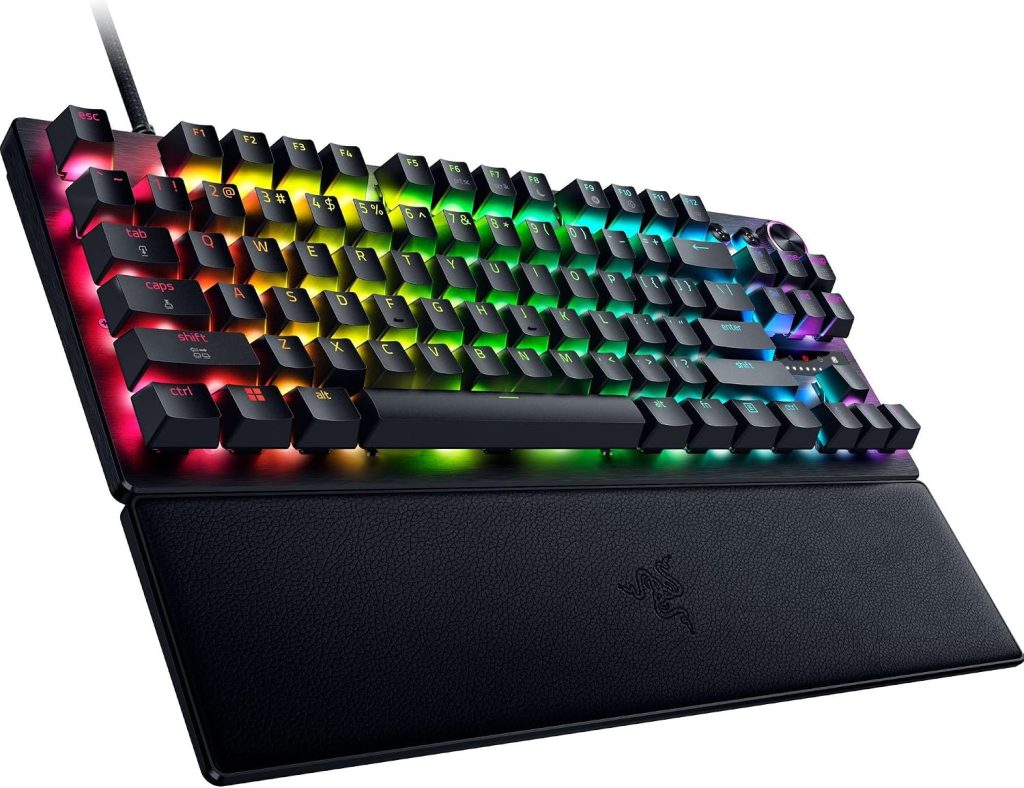
Typical 2026 price: $125–$220 depending on sale
Amazon rating snapshot: 4.4/5
Review sample: 600+ ratings in one current U.S. Amazon data snapshot
Layout: TKL
Switch: Analog optical
Best for: Valorant, CS2, Apex Legends and competitive FPS
Our Score: ⭐ 9.5/10
If your primary objective is competitive FPS performance, the Razer Huntsman V3 Pro TKL deserves a very close look.
In fact, Amazon recently dropped this keyboard to $124.99, down from its $229.99 retail price, making it particularly interesting for buyers looking for premium competitive features without paying full price. The deal was reported on September 3, 2026, and the keyboard carried a 4.4-star Amazon rating at that time.
The keyboard uses Razer’s Gen-2 analog optical switches and offers adjustable actuation, Rapid Trigger, Snap Tap, dual-keypress functionality, RGB lighting, and onboard controls.
The adjustable actuation range is particularly useful for FPS games.
Imagine you’re playing a tactical shooter. You want your movement keys to react almost instantly, but you don’t necessarily want every other key on the board to be ultra-sensitive. Razer lets you tune the board around that idea.
The latest 8KHz version also raises the polling rate substantially. RTINGS confirms that the 8KHz model provides adjustable actuation and Rapid Trigger alongside features such as Snap Tap and DKS.
Independent testing is similarly positive. Tom’s Hardware praised the build quality and programmability while noting that Razer Synapse remains somewhat bulky and that gamepad support can be dependent on software/game compatibility.
One major advantage is the dedicated competitive focus.
You aren’t paying for a huge collection of media controls you might never touch. Instead, you’re getting a compact TKL design that gives your mouse more breathing room.
At a significant Amazon discount, it’s particularly attractive.
Key Features
- Analog optical switches
- Adjustable actuation
- Rapid Trigger
- 8KHz polling
- Snap Tap
- DKS
- TKL layout
- RGB lighting
- Dedicated competitive controls
- Wrist rest
Pros
✅ Excellent FPS performance
✅ Rapid Trigger
✅ Adjustable actuation
✅ 8KHz polling
✅ Compact TKL footprint
✅ Excellent sale value when discounted
✅ Strong professional testing
Cons
❌ Wired only
❌ Razer Synapse can feel complicated
❌ Less suitable for users who need a numpad
❌ Some advanced functions are game-dependent
Verdict: A fantastic competitive FPS keyboard, especially when Amazon discounts it close to $125–$160.
3. ASUS ROG Azoth — Best Wireless Premium Keyboard
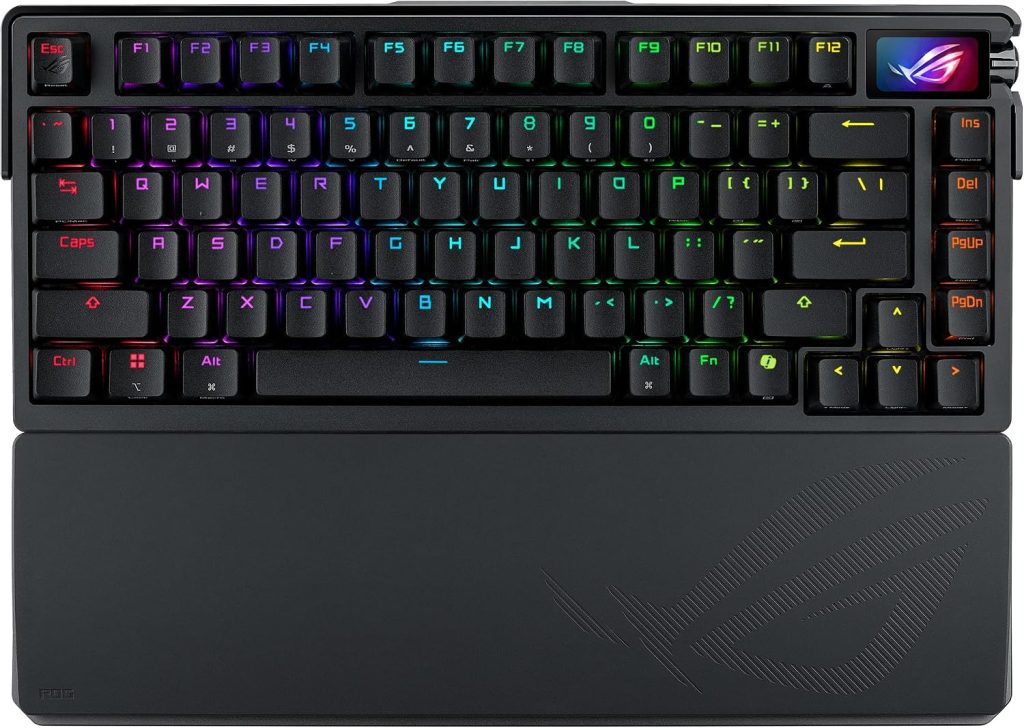
Typical 2026 price: $140–$250
Amazon-linked rating snapshot: 4.2/5 on a current variant snapshot
Review sample: Approximately 90 ratings in that variant snapshot
Layout: 75%
Switch: ROG NX mechanical
Best for: Wireless gaming + typing
Our Score: ⭐ 9.2/10
The ASUS ROG Azoth takes a different approach.
Instead of focusing exclusively on esports speed, ASUS tries to build a premium keyboard that works equally well for gaming, typing, and enthusiast customization.
The result is a 75% board with a gasket mount, three layers of dampening foam, hot-swappable pre-lubed ROG NX switches, PBT keycaps, a small OLED display, programmable controls, and tri-mode connectivity.
ASUS’s official U.S. product page currently lists the Azoth at $221.99 against a $249.99 reference price and highlights its gasket mount, three-layer dampening, hot-swappable switches, PBT keycaps, OLED display, control knob, and 2.4GHz SpeedNova wireless connectivity.
The customer feedback is mixed but useful.
One U.S. Amazon reviewer said the keyboard was worth the money despite initially being reluctant to spend so much, particularly praising its premium feel, smooth typing experience, wireless energy-saving behavior, and clicky switch sound.
The Azoth’s biggest advantage is therefore versatility.
During the day, you can use it for writing or productivity. At night, it becomes your gaming board. You also don’t need to commit to a wired-only setup.
And because the PCB is hot-swappable, enthusiasts have greater flexibility to experiment with switches.
That’s a big deal if you enjoy customizing hardware.
The downside? Its current Amazon review snapshot is not as strong as the SteelSeries board, and ASUS software can feel more involved than the minimalist interfaces found on some enthusiast keyboards.
Still, for someone who wants one premium keyboard to do almost everything, the Azoth is compelling.
Key Features
- 75% layout
- Tri-mode wireless connectivity
- 2.4GHz SpeedNova
- Bluetooth
- Wired USB-C
- OLED display
- Control knob
- Hot-swappable PCB
- ROG NX switches
- PBT keycaps
- Gasket mount
- Multi-layer sound dampening
Pros
✅ Wireless and wired connectivity
✅ Excellent typing feel
✅ Hot-swappable switches
✅ OLED screen
✅ Premium construction
✅ Great for work and gaming
✅ Compact 75% layout
Cons
❌ Customer ratings vary considerably by variant
❌ ASUS software can feel complicated
❌ Not as gaming-specialized as Hall-effect competitors
❌ Full-size users may miss the numpad
Verdict: The best choice for someone who wants a premium wireless keyboard that doesn’t sacrifice typing quality for gaming features.
4. Corsair K100 RGB — Best Full-Size Gaming Keyboard
Typical 2026 price: $200–$290
Layout: Full-size
Switch options: Cherry MX Speed / Corsair OPX
Best for: MMO, productivity and feature-heavy setups
Our Score: ⭐ 9.1/10
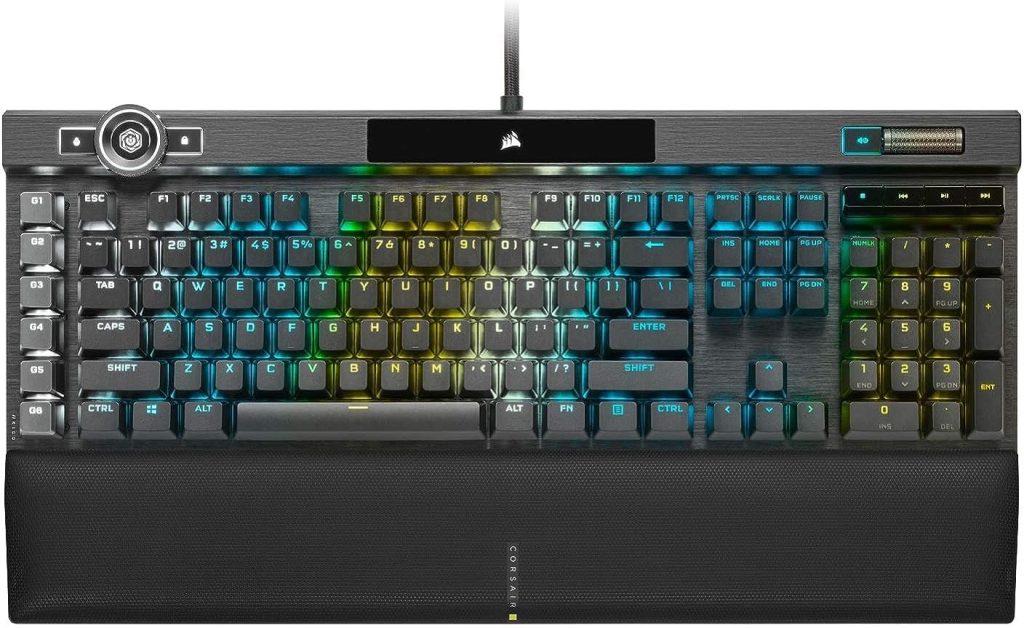
The Corsair K100 RGB proves that not every premium gaming keyboard needs to be compact.
If you love having a numpad, dedicated media controls, macro keys, and a large wrist rest, this is where the K100 makes its case.
RTINGS currently continues to recommend the K100 RGB as its top Corsair keyboard. The review highlights its low latency, excellent construction, dedicated macro column, programmable iCUE control wheel, media controls, and extensive RGB customization.
The K100 is also unusually feature-rich.
You get six dedicated macro keys, a multifunction control wheel, dedicated media controls, a padded wrist rest, per-key RGB, and compatibility with Corsair’s iCUE software.
For MMO gamers, that can be a huge advantage.
Instead of mapping important commands across obscure key combinations, you can put them directly on dedicated buttons.
The K100 also performs extremely well from a latency perspective. RTINGS reports remarkably low single- and multi-key latency and an 8,000Hz maximum polling rate, although its effective update rate in testing was 4,000Hz.
Customer feedback from Best Buy also provides useful corroborating evidence: the K100 has a 4.6/5 score from more than 1,200 reviews, with keyboard quality, RGB, and key feel among the most frequently praised attributes. Software and price are recurring complaints.
That’s the K100 in a nutshell.
It is extremely capable, but it isn’t cheap or small.
And because the switches are linear, people who prefer tactile feedback may find the typing experience less satisfying.
Key Features
- Full-size 100% layout
- Cherry MX Speed or Corsair OPX switches
- 8KHz maximum polling
- Six dedicated macro keys
- iCUE control wheel
- Dedicated media controls
- Padded wrist rest
- Per-key RGB
- USB passthrough
- iCUE software
Pros
✅ Outstanding feature set
✅ Excellent latency
✅ Six dedicated macro keys
✅ Excellent RGB
✅ Comfortable wrist rest
✅ Great for MMOs
✅ Full-size productivity layout
Cons
❌ Large footprint
❌ Wired only
❌ Expensive
❌ iCUE software can be overwhelming
❌ Linear switches aren’t for everyone
Verdict: The best premium full-size option for gamers who want maximum controls and don’t mind giving up desk space.
5. Keychron Q1 HE — Best Enthusiast Wireless Alternative
Typical 2026 price: Around $220–$230
Amazon price snapshot: Around $219.99
Layout: 75%
Switch: Gateron 2.0 magnetic
Best for: Gaming + custom keyboard enthusiasts
Our Score: ⭐ 9.0/10
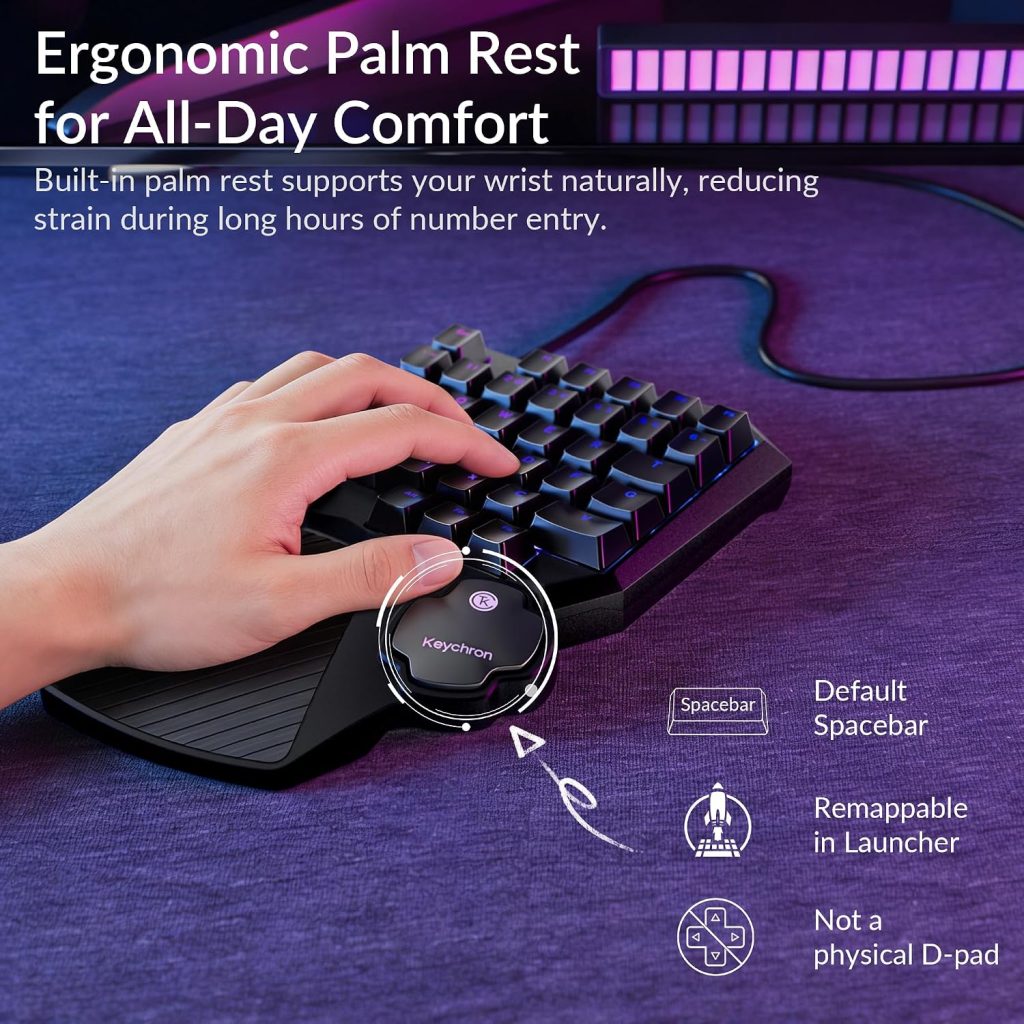
The Keychron Q1 HE is for the buyer who looks at a traditional gaming keyboard and thinks, “Nice, but I want something I can customize.”
It combines a substantial aluminum chassis with Hall-effect magnetic switches, a double-gasket mount, hot-swappable PCB, wireless connectivity, PBT keycaps, and a programmable knob.
Tom’s Hardware lists the Q1 HE at $219.99 on Amazon and describes it as a 75% wireless keyboard using Gateron 2.0 double-rail magnetic switches with an actuation range of 0.5–3.8mm.
RTINGS compares it favorably with the smaller K2 HE, noting that the Q1 HE has a heavier aluminum case and double-gasket mount that creates a softer, springier typing experience.
That’s where this keyboard separates itself from many mainstream gaming boards.
The Q1 HE feels like a custom mechanical keyboard that happens to be exceptionally good for gaming.
It also supports wireless operation, which is a significant advantage for people who want a cleaner desktop.
Recent community review analysis is reasonably positive as well, with a Reddit-derived review database showing a 64% positive sentiment score and praise for the aluminum construction, gasket mount, and 8K version’s switch compatibility.
However, there’s a learning curve.
Keychron’s customization ecosystem isn’t as immediately gaming-centric as SteelSeries or Razer. Additionally, RTINGS notes that some stabilizers can be inconsistent and prone to rattling.
For keyboard enthusiasts, though, those compromises may be easier to accept.
Key Features
- 75% layout
- Hall-effect magnetic switches
- Adjustable actuation
- Wireless connectivity
- Aluminum construction
- Double-gasket mount
- Hot-swappable PCB
- PBT keycaps
- Programmable knob
- RGB lighting
Pros
✅ Premium aluminum construction
✅ Excellent typing feel
✅ Hall-effect switches
✅ Wireless capability
✅ Highly customizable
✅ Great gaming + productivity combination
Cons
❌ Expensive
❌ Some stabilizer rattle can occur
❌ Less gaming-focused software
❌ Heavy compared with typical gaming keyboards
Verdict: A superb choice for gamers who also love enthusiast mechanical keyboards and want wireless flexibility.
Gaming Keyboard Comparison Table — 2026
| Model | Approx. Price | Layout | Switch | Wireless | Special Feature | Best For | Score |
|---|---|---|---|---|---|---|---|
| SteelSeries Apex Pro TKL Gen 3 | $160–240 | TKL | Hall Effect | No | OLED + adjustable actuation | Competitive gaming | 9.7/10 |
| Razer Huntsman V3 Pro TKL 8KHz | $125–220 | TKL | Analog Optical | No | Rapid Trigger + 8KHz | FPS esports | 9.5/10 |
| ASUS ROG Azoth | $140–250 | 75% | Mechanical | Yes | OLED + knob | Wireless gaming | 9.2/10 |
| Corsair K100 RGB | $200–290 | Full | Mechanical/Optical | No | Macros + iCUE wheel | MMO/productivity | 9.1/10 |
| Keychron Q1 HE | $220–230 | 75% | Hall Effect | Yes | Custom enthusiast design | Gaming + typing | 9.0/10 |
Prices are approximate 2026 U.S. snapshots and can change rapidly on Amazon.
Amazon User Review Summary
What do buyers actually seem to like?
That’s an important question because specifications don’t tell the whole story.
SteelSeries Apex Pro TKL Gen 3
The strongest recurring theme is responsiveness and adjustable actuation. U.S. customers praise the smooth feel, fast inputs, USB-C connection, and ability to customize actuation depth. The current Amazon-linked snapshot is approximately 4.7/5.
Razer Huntsman V3 Pro TKL
Customer feedback is generally positive about speed, responsiveness, competitive features, and compact size. The current Amazon rating snapshot is around 4.4/5, and the keyboard has recently received substantial Amazon discounts.
ASUS ROG Azoth
Users particularly appreciate premium construction, smooth typing, wireless operation, and the overall enthusiast feel. One U.S. Amazon reviewer described it as exceptionally smooth and premium after initially hesitating over the price.
Corsair K100 RGB
The dominant themes are build quality, RGB, key feel, wrist-rest comfort, response time, and the huge number of controls. Independent customer data also shows that software and price are the most common complaints.
Keychron Q1 HE
The Q1 HE attracts users who value aluminum construction, customizable switches, wireless operation, and a more traditional enthusiast keyboard feel. Its biggest compromises are weight, price, and the occasional complaint about stabilizer noise.
Which Gaming Keyboard Should You Buy?
Best Overall: SteelSeries Apex Pro TKL Gen 3
If you’re unsure which one to choose, this is my safest recommendation.
It combines competitive features, compact size, adjustable magnetic switches, strong customer feedback, and a useful OLED display without becoming as specialized as some esports-focused boards.
Best for FPS: Razer Huntsman V3 Pro TKL 8KHz
If you primarily play Valorant, Counter-Strike 2, Apex Legends, Overwatch, or other competitive shooters, the Razer is extremely compelling.
And when Amazon drops it to around $125, the value becomes difficult to ignore.
Best Wireless: ASUS ROG Azoth
For a clean desktop and a keyboard that doubles as a serious typing machine, the Azoth is the better fit.
Its wireless connectivity, OLED display, hot-swappable PCB, and premium construction make it much more versatile than a purely esports-focused board.
Best Full-Size: Corsair K100 RGB
If you use a numpad, play MMOs, or simply want a ridiculous number of dedicated controls, the K100 remains a powerhouse.
Best Enthusiast Choice: Keychron Q1 HE
If you’re the kind of person who enjoys tweaking switches, keycaps, sound, and configuration, the Q1 HE deserves serious attention.
Frequently Asked Questions
1. What is the best gaming keyboard in 2026?
For most competitive gamers, the SteelSeries Apex Pro TKL Gen 3 is an excellent overall choice because it combines magnetic switches, adjustable actuation, compact TKL design, and strong customer feedback.
For pure competitive FPS performance, the Razer Huntsman V3 Pro TKL is another outstanding choice.
2. Is a $200 gaming keyboard worth it?
It can be, but only if you’ll use the features.
A $200 board may provide better switches, improved construction, advanced software, wireless connectivity, hot-swapping, or specialized competitive functions. However, none of those features automatically makes you a better gamer.
If you mostly play casual games, spending $200 may provide diminishing returns.
3. Are Hall-effect keyboards better for gaming?
They can be better for certain gaming styles.
Hall-effect switches allow adjustable actuation and Rapid Trigger-type functions, which can be particularly useful for fast movement in FPS games.
However, a conventional mechanical keyboard can still provide an excellent gaming experience.
4. Is 8KHz polling actually useful?
It can reduce the interval between input reports, but the real-world improvement is relatively specialized.
Competitive players may appreciate every possible reduction in input latency. For ordinary gaming, however, switch feel, latency consistency, comfort, and software can matter more.
5. Should I buy a TKL or full-size keyboard?
Choose TKL if gaming and mouse movement are your main priorities.
Choose full-size if you use the numpad regularly or play games that benefit from lots of dedicated controls.
The Corsair K100 is therefore a better fit for MMO and productivity users, while the Apex Pro TKL is better suited to compact competitive setups.
6. Is wireless good enough for gaming in 2026?
Yes.
Modern 2.4GHz wireless technology can deliver excellent gaming performance. However, competitive players who want the simplest possible setup may still prefer wired keyboards.
The ASUS ROG Azoth and Keychron Q1 HE are particularly attractive if wireless connectivity is important.
7. Which keyboard is best for Valorant and CS2?
The Razer Huntsman V3 Pro TKL and SteelSeries Apex Pro TKL Gen 3 are excellent choices.
Their adjustable actuation and rapid-input features are especially relevant to tactical FPS games.
8. Which keyboard is best for typing and gaming?
The ASUS ROG Azoth and Keychron Q1 HE are particularly attractive because they combine gaming capabilities with enthusiast-oriented typing characteristics.
The Corsair K100 is also excellent if you prefer a full-size layout.
9. Does RGB lighting improve gaming performance?
No.
RGB is primarily aesthetic and can help you identify keys or profiles in some setups, but colorful lighting doesn’t reduce input latency or improve aim.
Buy RGB because you like it—not because a marketing department says it makes you faster.
10. What should I prioritize when buying a premium gaming keyboard?
I’d prioritize these factors in order:
- Switch feel and responsiveness
- Layout
- Latency
- Comfort and ergonomics
- Software
- Build quality
- Wireless capability
- Extra controls
- RGB and aesthetics
That approach prevents you from paying extra for features you’ll never use.
Final Verdict: Best Gaming Keyboard 2026
After comparing current 2026 testing, U.S. customer feedback, features, layouts, switch technology, connectivity, and pricing, these five premium boards each have a distinct advantage.
🏆 Best Overall: SteelSeries Apex Pro TKL Gen 3
🎯 Best FPS: Razer Huntsman V3 Pro TKL 8KHz
📡 Best Wireless: ASUS ROG Azoth
🎛️ Best Full-Size: Corsair K100 RGB
⌨️ Best Enthusiast: Keychron Q1 HE
If I had to choose one gaming keyboard for the broadest range of serious players, I’d pick the SteelSeries Apex Pro TKL Gen 3. Its magnetic switches, adjustable actuation, compact layout, OLED screen, and excellent customer rating make it an unusually balanced package.
For someone focused almost entirely on competitive shooters, however, I’d lean toward the Razer Huntsman V3 Pro TKL 8KHz—especially when Amazon’s price drops dramatically below its $229.99 retail price. The combination of Rapid Trigger, adjustable actuation, Snap Tap, and 8KHz polling is tailor-made for competitive play.
If you’re a competitive FPS player, prioritize response and adjustable actuation. Therefore, if you’re an MMO player, prioritize macros and layout. If you work and game at the same desk, comfort and typing feel matter enormously. If you hate cables, choose a good 2.4GHz wireless model.
And, naturally, check the exact Amazon listing before ordering. Prices, discounts, stock, seller, switch variant, layout, and included accessories can change quickly—particularly during major U.S. sales.
The right premium gaming keyboard shouldn’t simply look impressive on your desk. It should disappear beneath your hands and let you concentrate on the game.
That’s when you know you’ve bought the right one.