
Best Gaming Mouse 2026: 5 Amazon Favorites Reviewed
What Makes a Great Gaming Mouse?
A good gaming mouse should feel almost invisible in your hand. That’s the goal.
When you’re concentrating on an opponent, lining up a headshot, or making a rapid flick across the screen, you shouldn’t be thinking about the mouse. You should simply be making the movement.
That’s why weight and shape are so important.
Modern competitive mice have become dramatically lighter. The Logitech G PRO X SUPERLIGHT 2 weighs around 60g, while RTINGS measured the Razer Viper V3 Pro at approximately 53.8g. RTINGS found both excellent for competitive gaming, with the Razer offering slightly better raw performance and smoother feet in its comparison.
However, lightweight isn’t automatically better.
Sensor performance matters—but don’t get distracted by giant DPI numbers
Modern premium sensors are extremely accurate. You don’t need 30,000 or 35,000 DPI to play well.
In fact, most competitive players use much lower sensitivity settings.
Instead, pay attention to tracking consistency, click latency, sensor latency, wireless stability, and the overall feel of the mouse.
The Viper V3 Pro, for example, supports up to 8,000Hz wireless polling and delivers exceptionally low click and sensor latency in RTINGS testing.
Wireless is no longer automatically worse
Years ago, serious gamers often avoided wireless mice because of latency and reliability concerns.
That’s changed.
RTINGS notes that modern wireless gaming mice can match or even beat some wired mice for latency.
Consequently, wireless is now a completely legitimate choice for competitive gaming.
Quick Shopping Tips for a Gaming Mouse
Before buying, consider these factors.
1. Check your grip
Are you a palm, claw, or fingertip user? Your answer can dramatically change which mouse shape feels comfortable.
2. Consider hand size
Large hands may prefer larger ergonomic mice. Smaller or medium hands often have more options.
3. Don’t chase DPI
A 35,000-DPI sensor doesn’t automatically make a mouse better than a 20,000-DPI sensor.
4. Look at weight
If you play competitive FPS games, a lightweight mouse can make fast movements easier.
5. Count the buttons
FPS players may prefer fewer buttons. MMO players and productivity users may want many programmable controls.
6. Consider wireless charging
Some premium Logitech mice can integrate with Logitech’s charging ecosystem, which can be convenient for people who dislike plugging in cables.
7. Read critical reviews
Five-star reviews reveal what people love. Two- and three-star reviews often reveal recurring problems involving scroll wheels, software, buttons, battery life, or durability.
1. Logitech G PRO X SUPERLIGHT 2 — Best Overall for Competitive Gaming
Rating Score: 9.7/10

Product Description
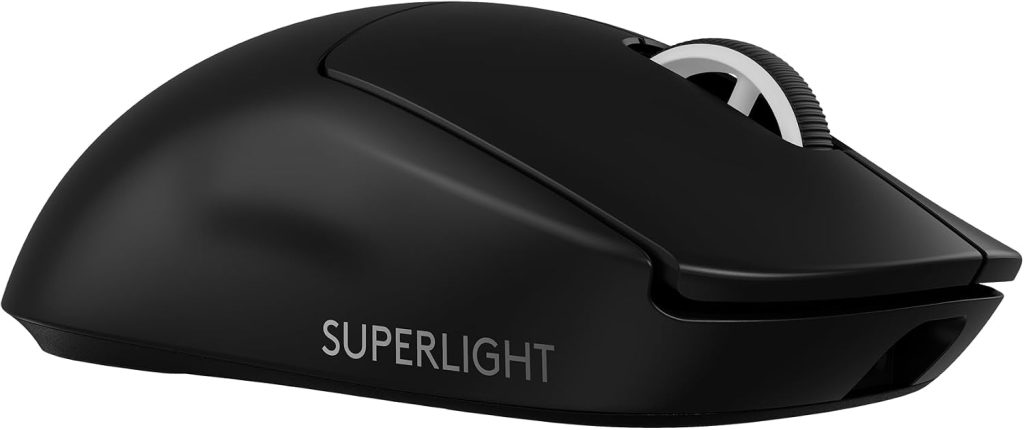
The Logitech G PRO X SUPERLIGHT 2 remains one of the safest choices for serious gamers because it focuses on the fundamentals rather than loading the mouse with unnecessary features.
It’s lightweight, symmetrical in shape, wireless, and designed specifically around competitive play.
Logitech lists the mouse at approximately 60g and equips it with the HERO 2 sensor and LIGHTFORCE hybrid optical-mechanical switches rated for 70 million clicks. The company describes it as an evolution of its professional gaming mouse platform.
The simplicity is actually part of the appeal.
There aren’t dozens of side buttons. There isn’t a giant RGB lighting system. Instead, you get a clean shape, excellent tracking, low weight, and dependable wireless connectivity.
Amazon-linked customer feedback is especially encouraging. A current review snapshot shows 4.5/5 from more than 2,300 reviews, while recent U.S. verified Amazon reviews praise the approximately 60g weight, accurate tracking, wireless performance, and battery life.
One verified U.S. reviewer in August 2026 described fast FPS movements as feeling effortless and said wireless performance was indistinguishable from wired use in their experience.
Another verified U.S. owner who previously used a G502 said the lighter Superlight 2 felt more comfortable during long gaming sessions, although they missed the G502’s infinite-scroll wheel and found the charging cable less impressive.
That’s an important distinction: the Superlight 2 is optimized for gaming, not maximum productivity functionality.
Key Features
- Approximately 60g design
- HERO 2 sensor
- LIGHTFORCE hybrid switches
- Wireless LIGHTSPEED connectivity
- High polling-rate support
- Long battery life
- Symmetrical shape
- Five programmable buttons
- USB-C charging
- Professional esports-oriented design
Amazon User Feedback Summary
Customers repeatedly praise the low weight, smooth movement, tracking accuracy, wireless reliability, and battery life.
The most common criticism is that it feels relatively minimalist. If you’re accustomed to a G502 with numerous controls, the Superlight 2 can feel almost bare.
Some customers also dislike the charging cable and the lack of productivity-focused features such as an infinite-scroll wheel.
Still, for FPS gaming, that simplicity is often an advantage.
Pros
PROS
- Excellent competitive performance
- Very lightweight
- Accurate sensor
- Excellent wireless connection
- Strong battery life
- Comfortable symmetrical shape
- Extensive Amazon review history
Cons
CONS
- Limited number of buttons
- No flashy RGB
- Less useful for MMO gaming
- Charging cable could be better
- Premium pricing
2. Razer Viper V3 Pro — Best for Competitive FPS
Rating Score: 9.6/10
Product Description
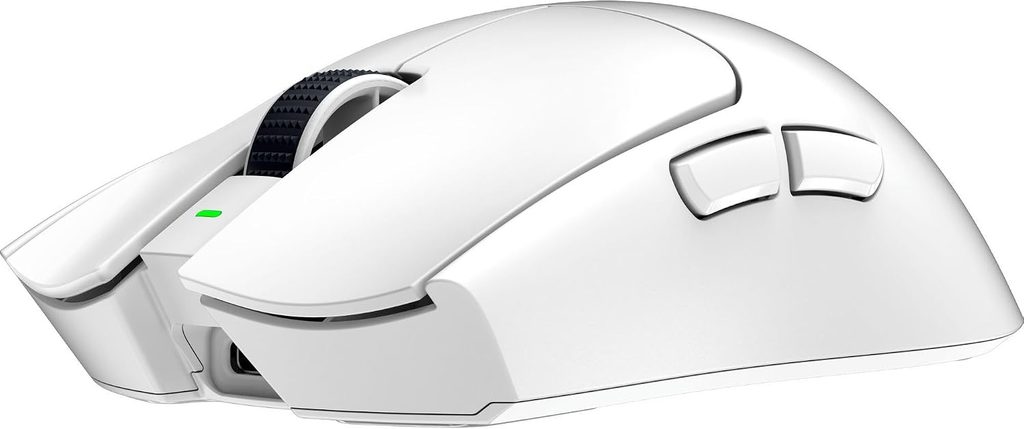
If your priority is competitive FPS performance, the Razer Viper V3 Pro is arguably the most compelling mouse in this group.
Although Razer has since released the newer Viper V4 Pro, the V3 Pro remains a high-performance option and can make sense when Amazon pricing makes it significantly cheaper than the newest generation. RTINGS currently describes it as an outstanding FPS mouse, praising its extremely low click and sensor latency, lightweight construction, comfortable symmetrical shape, and 8,000Hz polling capability.
The Viper V3 Pro weighs approximately 53.8g according to RTINGS’ measurements, making it lighter than the Superlight 2.
That lower weight is immediately relevant in competitive shooters.
Fast flicks require acceleration, deceleration, and repeated repositioning. A lighter mouse can reduce the physical effort involved, especially when paired with a large mouse pad and low sensitivity.
The shape is another strength. It’s symmetrical rather than strongly ergonomic, so it accommodates several grip styles.
Amazon’s current product page is available directly in the U.S., making this a particularly easy premium FPS option to compare against the Logitech.
The big caveat is timing. Because the Viper V4 Pro has replaced it at the top of Razer’s lineup, the V3 Pro is most attractive when discounted. RTINGS’ 2026 update explicitly identifies the V4 Pro as its successor.
Key Features
- Approximately 54g
- Focus Pro optical sensor
- Up to 8,000Hz wireless polling
- Symmetrical design
- Optical mouse switches
- Low click latency
- Low sensor latency
- Wireless connectivity
- Multiple programmable controls
- Razer Synapse customization
Amazon User Feedback Summary
Customers generally focus on the mouse’s weight, shape, sensor performance, and responsiveness.
Competitive FPS players particularly appreciate how quickly it moves across a mouse pad.
The primary concern is price, especially now that a newer generation exists. Some users also won’t benefit from 8,000Hz polling unless their PC can comfortably handle the additional processing demand.
Pros
PROS
- Extremely lightweight
- Outstanding FPS performance
- 8,000Hz polling
- Excellent sensor
- Excellent click latency
- Comfortable symmetrical design
- Strong build quality
Cons
CONS
- Premium price
- Newer Viper V4 Pro exists
- Limited number of buttons
- 8KHz is unnecessary for many players
- No Bluetooth
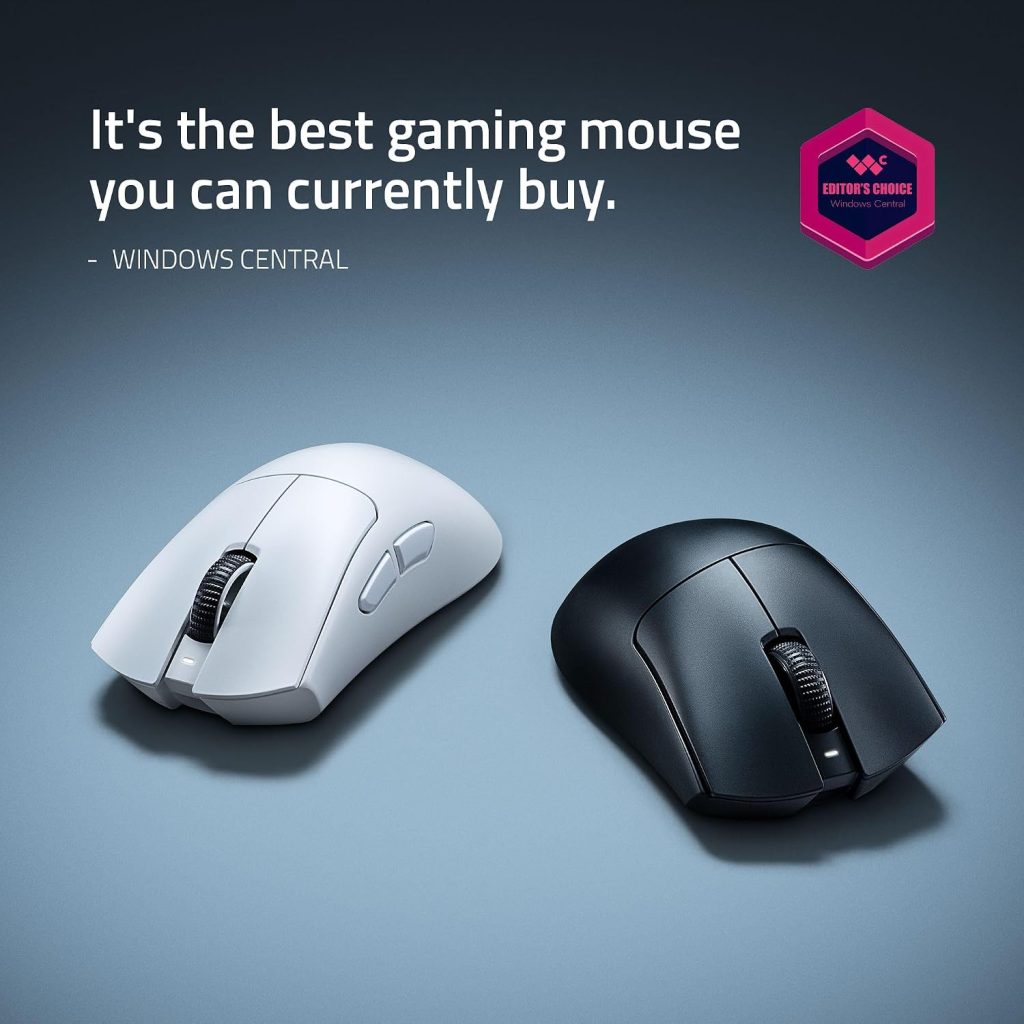
3. Razer DeathAdder V4 Pro — Best Ergonomic Gaming Mouse
Rating Score: 9.5/10
Product Description
Not everyone wants a symmetrical mouse.
If you prefer an ergonomic right-handed shape, the Razer DeathAdder V4 Pro is the standout option in this roundup.
Razer lists the DeathAdder V4 Pro at 56g, making it remarkably light despite its larger ergonomic design. It uses HyperSpeed Wireless Gen-2 and an optical scroll wheel.
The shape is the main reason to buy it.
The DeathAdder family has long been associated with an ergonomic profile, and the V4 Pro continues that philosophy while dramatically reducing weight.
That combination is especially attractive for palm and relaxed claw grips.
Customer feedback is already very strong despite this being a newer product. Best Buy’s current review database shows 4.7/5 from roughly 220 reviews, with 95% recommending it. Customers particularly praise its weight, overall performance, battery life, and ergonomics.
The manufacturer itself currently reports a 4.9/5 user rating across 34 reviews.
Of course, there is a tradeoff.
The DeathAdder’s ergonomic shape is designed primarily for right-handed users. If you use a left-handed setup or strongly prefer symmetrical mice, the Viper or Logitech is a better match.
It’s also worth noting that Bluetooth isn’t part of the design, so this is a gaming-first wireless mouse rather than a universal multi-device office mouse.
Key Features
- 56g ultra-light design
- Ergonomic right-handed shape
- HyperSpeed Wireless Gen-2
- Optical scroll wheel
- High polling-rate support
- Optical switches
- Long advertised battery life
- Esports-focused construction
- Razer Synapse customization
Amazon/User Feedback Summary
The biggest praise centers on weight and ergonomics.
Customers who like the DeathAdder shape tend to find it comfortable for long sessions, while the low weight makes it much more competitive than traditional ergonomic mice.
The main complaints concern its size for smaller hands and the lack of Bluetooth.
Pros
PROS
- Excellent ergonomic shape
- Only about 56g
- Strong battery life
- Excellent performance
- Optical scroll wheel
- Excellent wireless technology
- Strong early customer satisfaction
Cons
CONS
- Right-handed only
- Larger shape may not suit small hands
- No Bluetooth
- Expensive
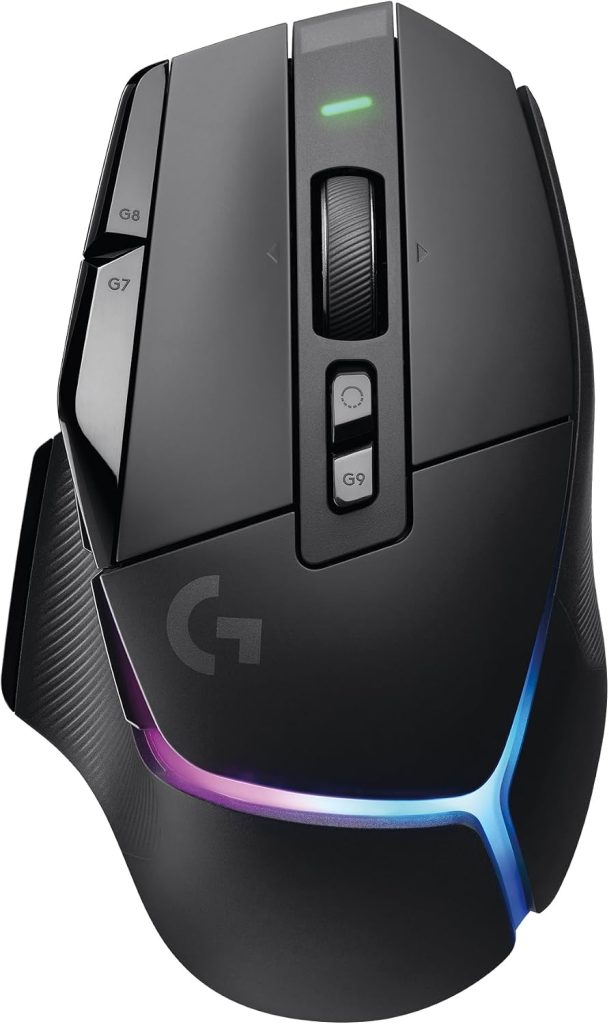
4. Logitech G502 X PLUS — Best for Customization and Productivity
Rating Score: 9.3/10
Product Description
The Logitech G502 X PLUS is completely different from the minimalist Superlight 2.
Where the Superlight focuses on speed and simplicity, the G502 X PLUS says, “Give me more buttons.”
And sometimes that’s exactly what you want.
The mouse provides a large ergonomic body, numerous programmable controls, LIGHTSYNC RGB, a free-scrolling wheel, and Logitech’s HERO 25K sensor. It’s particularly useful for gamers who play MMOs, strategy games, simulators, or games that benefit from numerous shortcuts.
It’s also a fantastic work-and-play mouse.
Current customer data from Best Buy shows 4.7/5 from more than 1,600 reviews, with customers particularly praising battery life, weight, overall performance, quality, and ease of use. About 95% of reviewers recommend it.
Amazon-linked review data is similarly positive, showing approximately 4.5/5 from more than 2,500 customer reviews in a current snapshot. A verified U.S. review from August 2026 praised the comfortable construction, crisp clicks, accurate sensor, wireless reliability, extra programmable buttons, and simple setup.
However, the G502 X PLUS isn’t a lightweight esports mouse.
That’s the whole point.
It feels more substantial in your hand, and users coming from ultra-light FPS mice may find it heavy.
On the other hand, if you spend half your day working and half gaming, that extra functionality can be a major advantage.
Key Features
- HERO 25K sensor
- LIGHTFORCE hybrid switches
- LIGHTSYNC RGB
- Multiple programmable buttons
- Free-spinning scroll wheel
- Wireless LIGHTSPEED
- USB-C charging
- Ergonomic right-handed design
- Logitech G HUB customization
- Strong battery life
Amazon User Feedback Summary
Customers love the number of controls, comfortable ergonomic shape, RGB lighting, wireless reliability, and battery life.
It’s particularly well-liked by people who use the mouse for both gaming and productivity.
The biggest complaints concern G HUB software, weight, and price. A recent U.S. Amazon review praised almost every aspect but still noted that software can be a weak point in some situations.
Pros
PROS
- Excellent button customization
- Great for gaming and work
- Comfortable ergonomic design
- Excellent scroll wheel
- Strong battery life
- RGB lighting
- Excellent customer satisfaction
Cons
CONS
- Heavy compared with esports mice
- Large shape
- G HUB software can be frustrating
- Expensive
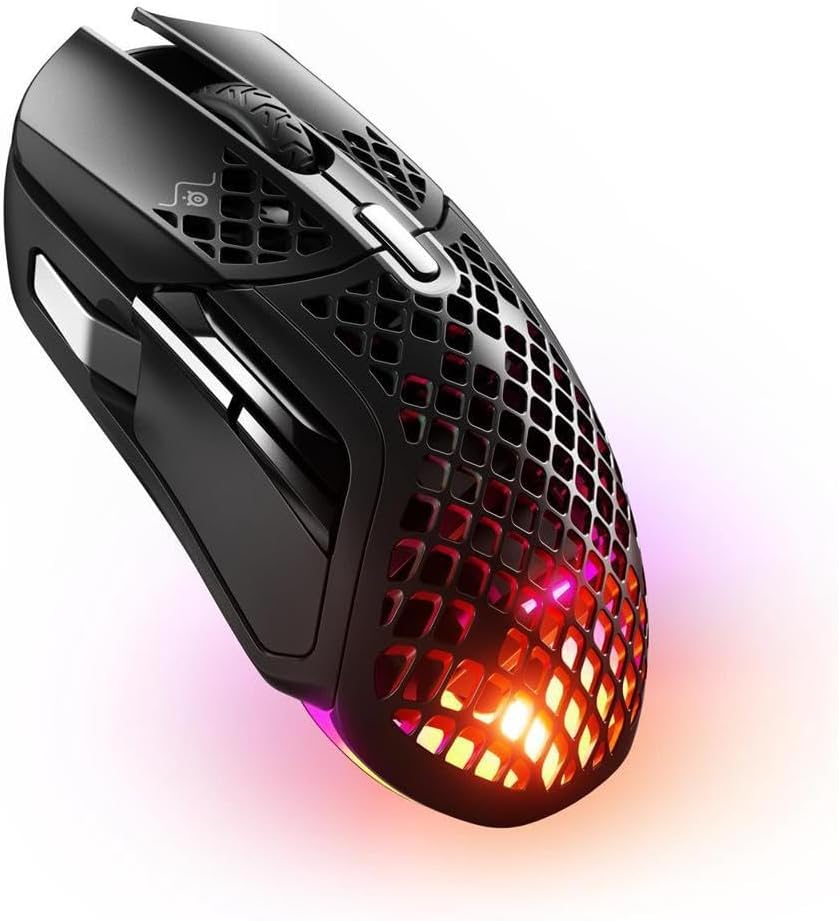
5. SteelSeries Aerox 5 Wireless — Best for Extra Buttons
Rating Score: 9.0/10
Product Description
The SteelSeries Aerox 5 Wireless is a particularly interesting choice because it combines a lightweight design with numerous programmable controls.
The mouse weighs around 74g, according to current product information, and features a nine-button programmable layout, including five quick-action side controls. It also uses a honeycomb-style exterior and IP54-rated AquaBarrier protection.
That makes it especially attractive for gamers who want more controls without moving to an enormous MMO mouse.
The extra side buttons are useful for MOBAs, MMOs, battle royale games, and productivity shortcuts. For example, you could map melee, grenade, push-to-talk, inventory, or ability commands to different buttons.
Customer satisfaction is solid. Best Buy currently shows 4.4/5 from 334 reviews, with customers particularly praising weight, battery life, and overall performance.
The honeycomb construction also gives it a distinctive appearance.
Some people love it.
Others prefer a traditional closed shell because it feels easier to keep clean and more substantial.
The Aerox 5 is therefore less focused on absolute competitive FPS performance than the Superlight 2 or Viper V3 Pro. Instead, it’s trying to give you a broader feature set without becoming a brick on your desk.
Key Features
- Approximately 74g
- Nine programmable buttons
- Five quick-action side buttons
- Wireless connectivity
- RGB lighting
- Honeycomb shell
- IP54-rated AquaBarrier
- SteelSeries GG software
- Designed for FPS, MOBA, MMO, and general gaming
Amazon/User Feedback Summary
Customers frequently mention the lightweight feel, battery life, side-button layout, RGB lighting, and comfortable shape.
The additional controls are the biggest attraction.
The tradeoff is that the mouse isn’t as light as the very best competitive FPS mice, and some players simply don’t need nine buttons.
Pros
PROS
- Nine programmable buttons
- Lightweight for its feature set
- Good battery life
- RGB lighting
- Water/dust resistance
- Versatile for multiple game genres
Cons
CONS
- Heavier than esports-focused mice
- Honeycomb shell isn’t for everyone
- More complex software
- Side buttons can take adjustment
Gaming Mouse Comparison Table
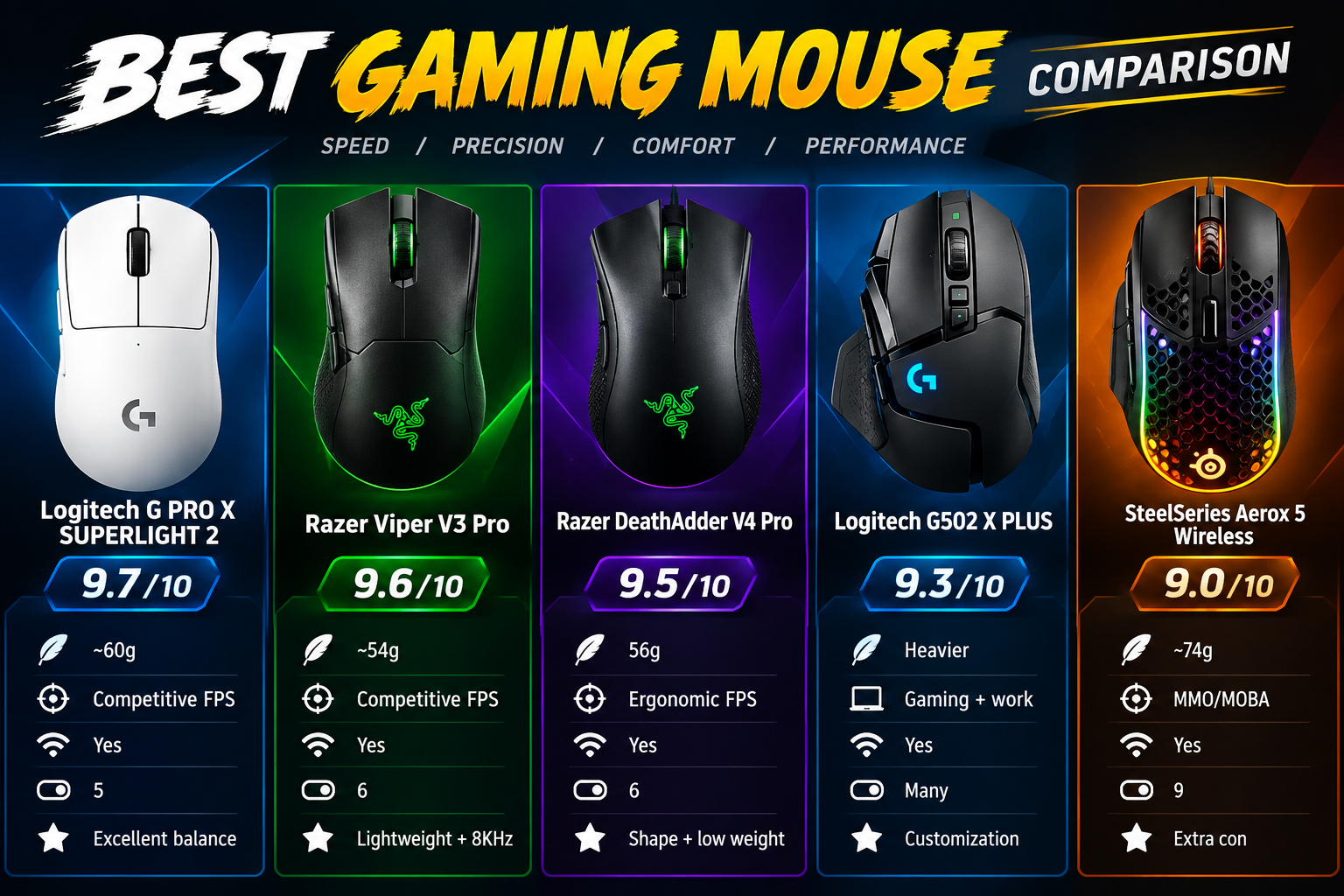
| Model | Rating Score | Approx. Weight | Best For | Wireless | Buttons | Biggest Advantage |
|---|---|---|---|---|---|---|
| Logitech G PRO X SUPERLIGHT 2 | 9.7/10 | ~60g | Competitive FPS | Yes | 5 | Excellent balance |
| Razer Viper V3 Pro | 9.6/10 | ~54g | Competitive FPS | Yes | 6 | Lightweight + 8KHz |
| Razer DeathAdder V4 Pro | 9.5/10 | 56g | Ergonomic FPS | Yes | 6 | Shape + low weight |
| Logitech G502 X PLUS | 9.3/10 | Heavier | Gaming + work | Yes | Many | Customization |
| SteelSeries Aerox 5 Wireless | 9.0/10 | ~74g | MMO/MOBA | Yes | 9 | Extra controls |
Editorial scores are based on performance, design, feature set, customer feedback, versatility, and current 2026 positioning. They are not Amazon star ratings.
Quick Recommendation
🏆 Best Overall: Logitech G PRO X SUPERLIGHT 2
For most competitive gamers, this is the safest choice. It’s lightweight, accurate, comfortable, wireless, and backed by a large body of customer feedback.
🎯 Best Competitive FPS: Razer Viper V3 Pro
Choose this if your priority is minimizing weight and maximizing responsiveness. RTINGS continues to rate its raw performance extremely highly.
🖐️ Best Ergonomic: Razer DeathAdder V4 Pro
If symmetrical mice don’t feel natural, the DeathAdder V4 Pro is the obvious alternative. Its 56g weight makes it unusually light for an ergonomic design.
🧰 Best Customization: Logitech G502 X PLUS
Choose this if you want plenty of buttons, RGB, an excellent scroll wheel, and a mouse that works well for both gaming and office tasks.
🎮 Best Extra-Button Alternative: SteelSeries Aerox 5 Wireless
Choose this if you want additional controls for MMOs, MOBAs, battle royale games, or productivity without buying a giant MMO mouse.
How to Choose the Right Gaming Mouse
The first question should be simple:
What games do you actually play?
If the answer is mainly Counter-Strike, Valorant, Apex Legends, Overwatch, Fortnite, or another competitive shooter, prioritize weight, shape, sensor performance, click latency, and wireless reliability.
In that situation, the Superlight 2 or Viper V3 Pro makes tremendous sense.
If you’re playing World of Warcraft, Final Fantasy XIV, Elder Scrolls Online, or another MMO, additional buttons become much more valuable. The Aerox 5 or G502 X PLUS makes more sense.
What if you play games and work on the same computer?
That’s where the G502 X PLUS becomes particularly attractive. Its programmable buttons and free-spinning wheel are useful outside gaming as well.
Palm grip vs. claw grip vs. fingertip grip
Your grip is one of the most overlooked buying factors.
A palm grip means most of your hand rests on the mouse. Larger ergonomic designs can feel particularly comfortable here.
A claw grip arches the fingers, allowing quick clicks and movements. Symmetrical mice such as the Superlight 2 and Viper V3 Pro are popular options.
A fingertip grip uses only the fingers to control the mouse. Lighter designs are often attractive because they require less effort to reposition.
Don’t assume your friend’s favorite mouse will feel good in your hand. Hand size and grip style can change the experience dramatically.
How important is 8,000Hz polling?
It’s useful, but don’t treat it like magic.
A higher polling rate can provide more frequent position updates, which can make cursor movement smoother, particularly at high refresh rates.
However, RTINGS’ testing and general product guidance suggest that overall mouse performance involves much more than polling rate.
In other words, don’t buy an uncomfortable mouse simply because it advertises 8KHz.
Comfort comes first.
Should you buy wireless?
For modern premium mice, yes, if you want it.
Wireless latency has improved dramatically. RTINGS notes that contemporary wireless gaming mice can deliver latency comparable to or better than wired competitors.
Wireless also eliminates cable drag, which is particularly useful for low-sensitivity FPS players.
Frequently Asked Questions
1. What is the best gaming mouse in 2026?
For this Amazon-focused roundup, the Logitech G PRO X SUPERLIGHT 2 is the best overall recommendation because it combines low weight, excellent tracking, strong wireless performance, long battery life, and a comfortable shape.
However, the newer Razer Viper V4 Pro currently occupies a higher position in RTINGS’ 2026 testing.
2. Is the Logitech Superlight 2 good for FPS games?
Yes. It’s specifically designed around competitive gaming, and customer feedback frequently praises its low weight, accurate tracking, wireless responsiveness, and battery life.
3. Is the Razer Viper V3 Pro still worth buying in 2026?
Yes—particularly if you find it discounted. The Viper V4 Pro is now the newer model, but the V3 Pro still offers exceptional FPS performance, very low weight, and 8,000Hz polling.
4. Which gaming mouse is best for large hands?
The answer depends on your grip. The DeathAdder V4 Pro’s ergonomic shape can work especially well for larger right-handed users, while the Viper V3 Pro’s flatter symmetrical profile is also accommodating for many medium-to-large hands. RTINGS specifically notes that the Viper shape works across a wide range of hand sizes and grip styles.
5. Which gaming mouse has the most buttons?
The Logitech G502 X PLUS and SteelSeries Aerox 5 Wireless are the best choices in this roundup if you want lots of programmable controls. The Aerox 5 provides nine programmable buttons, while the G502 X PLUS offers numerous configurable controls plus its distinctive scroll wheel.
6. Is a lightweight gaming mouse better?
Not necessarily.
Lightweight mice can make rapid movements easier, which is particularly valuable in FPS games. However, some players prefer heavier mice because they feel more stable.
Your preferred weight should ultimately depend on your grip, sensitivity, mouse pad, and game genre.
7. Do I need an 8KHz gaming mouse?
No. An 8KHz mouse can provide very high update frequency, but most players won’t suddenly become better gamers because of it.
Shape, comfort, sensor quality, click latency, and consistency are generally more important.
8. Is the G502 X PLUS good for productivity?
Yes. That’s one of its strongest advantages. The programmable buttons and free-spinning scroll wheel make it useful for browser navigation, editing, media control, and other desktop tasks in addition to gaming.
Customer reviews frequently praise its versatility for both gaming and everyday computer use.
Conclusion: Best Gaming Mouse 2026
The gaming-mouse market is packed with excellent options, but they aren’t all designed for the same player.
For competitive FPS gaming, the Logitech G PRO X SUPERLIGHT 2 is the easiest recommendation. Its approximately 60g design, accurate sensor, excellent wireless connection, comfortable shape, and large customer-review history create an excellent overall package.
The Razer Viper V3 Pro takes the competitive approach even further by dropping weight to roughly 54g and supporting 8,000Hz wireless polling. It’s especially attractive when Amazon discounts it below the newer Viper V4 Pro.
Meanwhile, the Razer DeathAdder V4 Pro demonstrates that ergonomic mice don’t have to be heavy. At 56g, it combines a right-handed ergonomic shape with extremely low weight and strong battery life. Current customer feedback is particularly enthusiastic about its weight, ergonomics, and performance.
The Logitech G502 X PLUS goes in the opposite direction. It’s heavier, larger, and packed with controls—but that’s exactly what makes it useful for MMO players, productivity users, and gamers who want one mouse for almost everything.
Finally, the SteelSeries Aerox 5 Wireless occupies an appealing middle ground, giving you nine programmable buttons without the bulk of a traditional MMO mouse.