
Best Gaming Monitor 2026: 5 Amazon Favorites Reviewed
What Makes a Great Gaming Monitor?
What makes a gaming monitor genuinely good?
It isn’t simply the largest screen or highest refresh-rate number.
Instead, a great gaming display balances resolution, refresh rate, response time, input lag, image quality, HDR performance, variable refresh rate, connectivity, and ergonomics.
For example, a 4K 240Hz OLED monitor sounds incredible—and it is—but you’ll need a powerful graphics card to take advantage of all those pixels at 240 frames per second.
Meanwhile, a 1440p 240Hz monitor can be a much smarter choice for competitive FPS gaming because achieving very high frame rates at 1440p is considerably easier.
OLED vs. IPS vs. Mini-LED
Firstly, OLED is currently the premium technology for gaming.
OLED pixels can turn themselves completely off, creating extremely deep blacks and virtually no haloing around bright objects. They also offer near-instantaneous pixel response, which makes fast motion exceptionally clean. RTINGS’ 2026 testing continues to highlight these advantages across OLED gaming monitors.
However, OLED isn’t perfect.
Static elements can eventually contribute to burn-in, although modern OLED gaming monitors include various protective technologies. OLED models can also cost substantially more than conventional IPS displays.
Mini-LED is an interesting middle ground.
The AOC Q27G3XMN, for example, uses 336 local-dimming zones and VESA DisplayHDR 1000 certification. RTINGS finds it particularly impressive for HDR and dark-room gaming, although VA-related black smearing and VRR flicker remain weaknesses.
IPS, meanwhile, remains an excellent practical choice.
It usually offers strong viewing angles, good color reproduction, fast response, and no OLED burn-in concern. The LG 27GR83Q-B is a great example: it’s a 27-inch 1440p IPS display capable of 240Hz and HDMI 2.1.
How much refresh rate do you really need?
Do you need 240Hz?
Not necessarily.
For casual gaming, 144Hz or 165Hz can already feel dramatically smoother than 60Hz. However, if you’re playing competitive shooters and your computer can consistently generate high frame rates, 240Hz can provide a noticeably smoother experience.
RTINGS currently recommends 240Hz monitors across several categories, but it also points out that the appropriate resolution depends on the power of your gaming PC.
In other words, don’t buy a 4K 240Hz monitor simply because the specification looks impressive.
Buy it because your hardware and games can make good use of it.
Quick Shopping Tips for a Gaming Monitor
1. Match resolution to your GPU
A powerful GPU makes 4K more attractive. For mid-range hardware, 1440p is often the sweet spot.
2. Look for HDMI 2.1 for modern consoles
If you’re using PS5, PS5 Pro, or Xbox Series X|S, HDMI 2.1 can be important for 4K at 120Hz.
3. Don’t obsess over advertised response time
A claimed “0.03ms” number doesn’t tell the entire story. Real-world motion handling and input latency matter more.
4. Consider OLED carefully
OLED provides outstanding image quality, but consider your usage pattern and burn-in protection before purchasing.
5. Think about screen size
27 inches is excellent for competitive gaming. A 32-inch 4K monitor provides more immersion and workspace.
6. Check the stand
Height, tilt, swivel, and pivot adjustment can make a surprisingly large difference.
7. Read Amazon’s critical reviews
Pay particular attention to comments about dead pixels, firmware, VRR flicker, HDMI behavior, brightness, and quality control.
8. Remember that “wireless” doesn’t mean wireless video
A wireless gaming monitor still generally requires HDMI, DisplayPort, or USB-C for the actual image signal. Wireless mice, keyboards, and headsets can make the overall desk setup wireless, but the display itself typically remains wired.
1. ASUS ROG Swift OLED PG32UCDM Gen3 — Best Overall
Rating Score: 9.9/10

Product Description
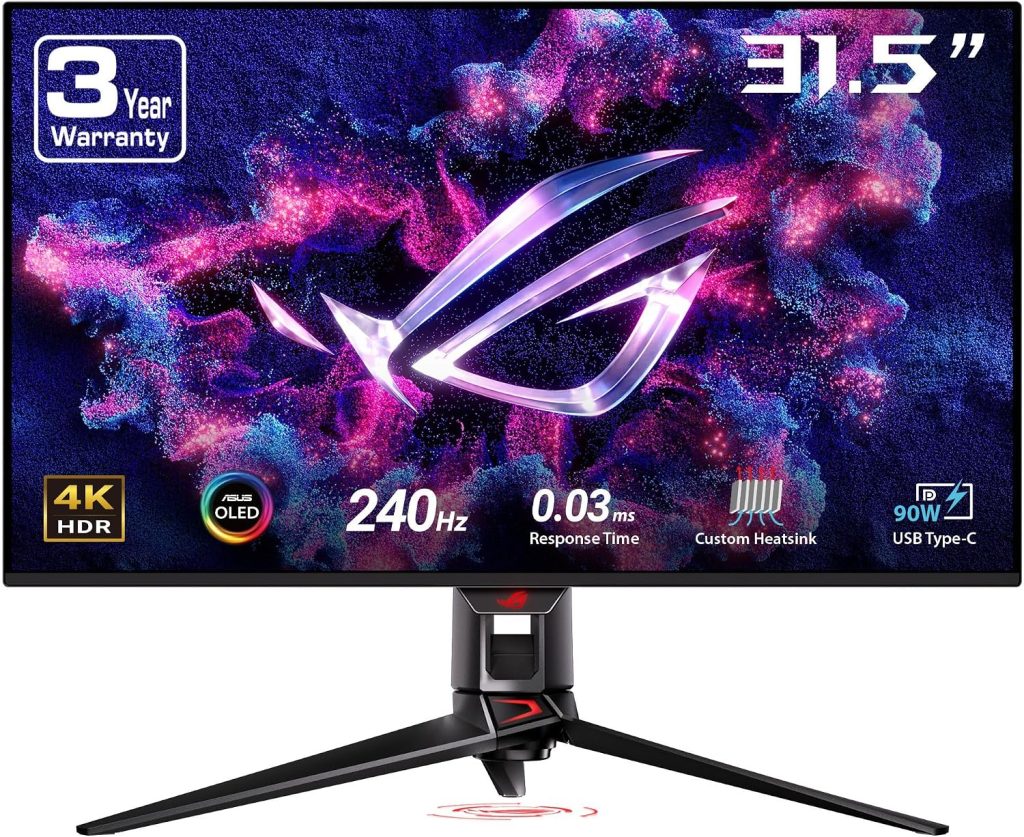
The ASUS ROG Swift OLED PG32UCDM Gen3 is the monitor I’d choose when budget isn’t the primary concern and you want a display that feels genuinely next-generation.
Moreover, it’s a 31.5-inch 4K QD-OLED monitor running at 240Hz, with a near-instantaneous response time and support for both HDMI 2.1 and full-bandwidth DisplayPort 2.1. ASUS also adds a USB-C connection with 90W power delivery, a USB hub, KVM functionality, Dolby Vision, and its OLED Care Pro system.
RTINGS currently ranks it as the best gaming monitor it has tested in 2026. Its testing highlights extremely sharp motion, low input lag, outstanding HDR, vivid colors, deep blacks, and compatibility with modern consoles and graphics cards.
The fourth-generation Tandem QD-OLED panel is another important upgrade.
ASUS rates peak HDR brightness at 1,000 cd/m², while the BlackShield coating is designed to improve resistance to scratches and reduce some of the black-level problems associated with older QD-OLED panels.
There are downsides, naturally.
The price is high. OLED burn-in remains a consideration despite the extensive protection features. Therefore, QD-OLED’s triangular subpixel arrangement can produce some text fringing, which matters more if you plan to use the monitor heavily for office work.
Still, for a premium gaming setup, this is one heck of a display.
Key Features
- 31.5-inch 4K resolution
- 3840 × 2160
- Tandem QD-OLED
- 240Hz refresh rate
- 0.03ms advertised response time
- DisplayPort 2.1 UHBR20
- HDMI 2.1
- USB-C with 90W power delivery
- KVM switch
- Dolby Vision
- OLED Care Pro
- Neo Proximity Sensor
- VESA DisplayHDR 500 True Black
Amazon/User Feedback Summary
Unfortunately, Amazon availability is confirmed through current retailer/testing links, although a dependable current U.S. Amazon star-count snapshot for the Gen3 version wasn’t exposed in the available search data. Therefore, I wouldn’t invent a rating.
Instead, the buying case is strongly supported by independent 2026 testing and ASUS’s current specifications. RTINGS specifically recommends the monitor for PC and console gaming, while noting the risk of burn-in and text-fringing limitations.
Pros
PROS
- Exceptional 4K image quality
- 240Hz OLED performance
- Excellent HDR
- HDMI 2.1 and DisplayPort 2.1
- USB-C 90W
- KVM switch
- Excellent console compatibility
- Advanced OLED protection
Cons
CONS
- Very expensive
- OLED burn-in remains a consideration
- Text fringing
- Blacks can still look raised in very bright environments
- Requires powerful hardware for 4K/240Hz
2. Alienware AW2725Q — Best 27-Inch 4K OLED
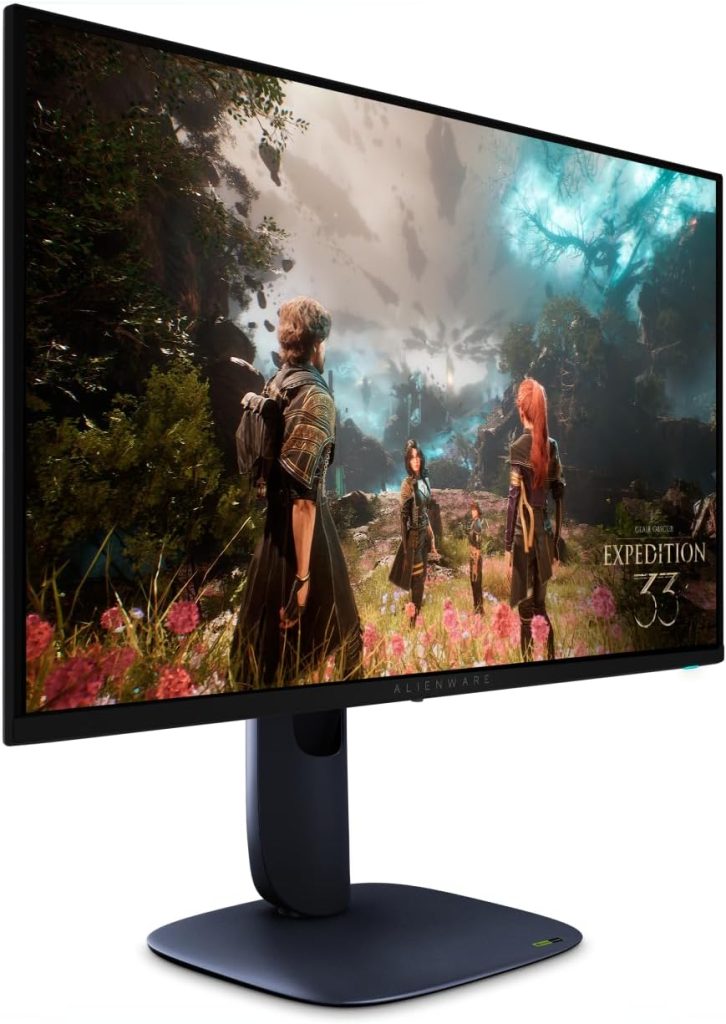
Rating Score: 9.6/10
Product Description
Want the benefits of 4K OLED but prefer a smaller 27-inch screen?
The Alienware AW2725Q is one of the most compelling options.
It’s a 27-inch 4K 240Hz QD-OLED gaming monitor with HDMI 2.1, VRR support, Dolby Vision, and a flat display. RTINGS’ 2026 retest confirms its premium positioning and describes it as a strong alternative to ASUS’s more expensive models.
The biggest attraction is pixel density.
At 27 inches, 4K produces an extremely sharp image. Text, game interfaces, fine textures, foliage, and distant objects can look beautifully defined.
And because it’s OLED, motion remains incredibly crisp.
Tom’s Hardware called it one of the fastest 4K OLED monitors it had reviewed and praised its bright, sharp, colorful image, accurate out-of-box color, low input lag, and excellent motion resolution.
TechSpot’s 2026 database also includes the AW2725Q among its best monitor selections, with a user-score dataset based on more than 100 user ratings.
There are tradeoffs compared with the ASUS PG32UCDM Gen3.
The Alienware doesn’t offer DisplayPort 2.1, and it lacks some of ASUS’s productivity-oriented features, including the KVM switch.
Still, if you want a smaller 4K OLED for a high-end gaming PC, this is a very sensible alternative.
Key Features
- 27-inch display
- 3840 × 2160
- QD-OLED
- 240Hz
- HDMI 2.1
- VRR
- Dolby Vision
- Flat screen
- Fast OLED response
- Ergonomic stand
Amazon/User Feedback Summary
The Amazon-linked product is available for shoppers, while independent review databases strongly support its performance.
The main themes from user feedback and expert testing are sharp image quality, vivid color, fast motion, HDR performance, and premium gaming responsiveness. Some buyers may prefer a 32-inch screen for immersion, while others will appreciate the sharper pixel density of 27 inches.
Pros
PROS
- Excellent 4K sharpness
- 240Hz OLED
- Very fast response
- Excellent HDR
- Strong color performance
- HDMI 2.1
- Smaller footprint than 32-inch OLEDs
Cons
CONS
- No DisplayPort 2.1
- No KVM
- OLED burn-in consideration
- Premium pricing
- 27-inch screen may feel small for some gamers
3. MSI MAG 271QPX QD-OLED — Best 1440p OLED for Competitive Gaming
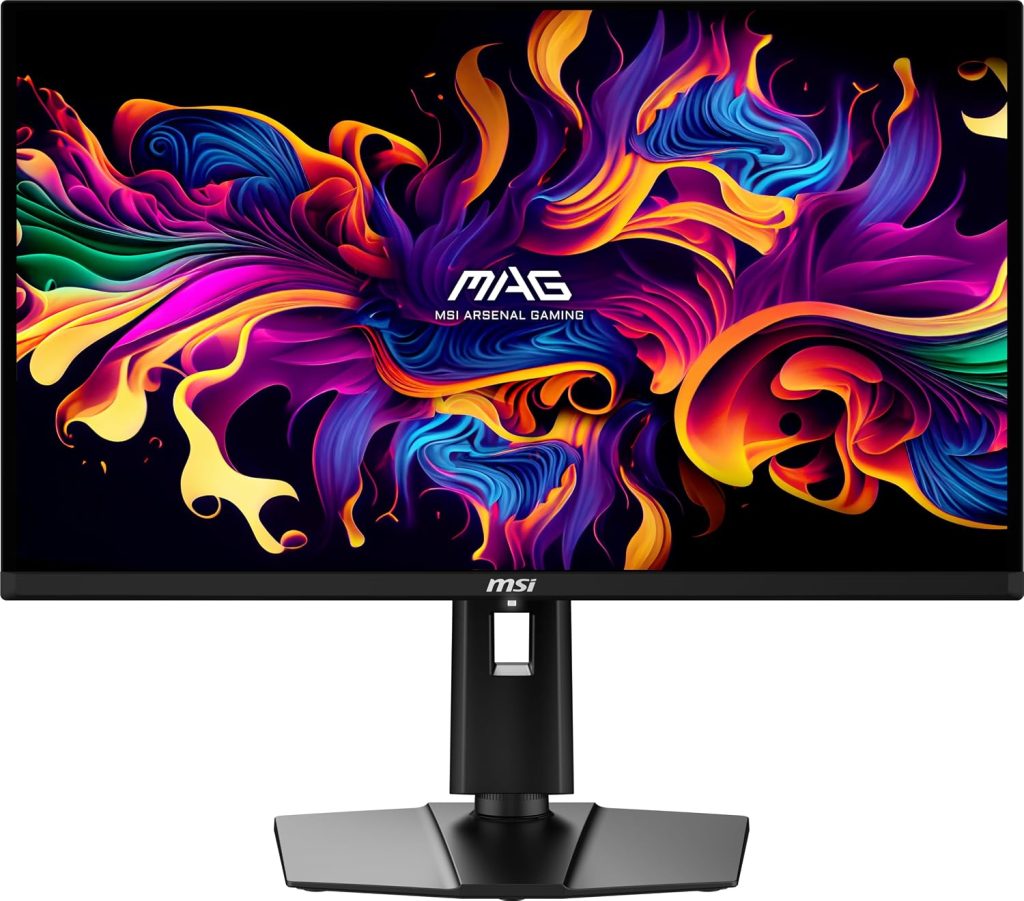
Rating Score: 9.5/10
Product Description
If 4K isn’t essential and competitive gaming is your priority, the MSI MAG 271QPX QD-OLED becomes extremely interesting.
This is a 27-inch 1440p QD-OLED monitor designed around extremely fast gaming performance. Depending on the exact version, you’ll find refresh rates reaching 360Hz, making it particularly attractive for competitive shooters.
And here’s where this monitor makes a lot of sense.
A 1440p display requires significantly less GPU horsepower than 4K. Therefore, reaching very high frame rates is easier. For games such as Valorant, Counter-Strike, Overwatch, Fortnite, Apex Legends, and similar titles, that can be more useful than having 4K resolution.
Amazon-linked customer feedback is particularly strong. One current review snapshot for the MSI MAG 271QPX shows 4.3/5 from 251 customer reviews, with 73% five-star ratings.
Another Amazon-linked snapshot for the E2 version shows 4.6/5 from 218 reviews, including 80% five-star ratings.
U.S. customer comments are especially enthusiastic about image quality, color, responsiveness, setup, and competitive gaming.
One U.S. reviewer described the colors as exceptionally vibrant and praised the 240Hz-class smoothness and fast response. Another customer called it a strong OLED value and praised the display for gaming and movies.
However, there are negative reports.
One verified Amazon customer reported audible coil whine that varied with the displayed content. That’s exactly the sort of issue worth checking in critical reviews before purchase.
Key Features
- 27-inch QHD
- 2560 × 1440
- QD-OLED
- Up to 360Hz depending on version
- 0.03ms-class response
- HDR support
- HDMI
- DisplayPort
- VRR
- Gaming-focused OSD
- OLED protection features
Amazon User Feedback Summary
This is one of the stronger Amazon-review stories in the roundup.
Customers repeatedly praise the color, sharpness, smoothness, OLED contrast, fast response, and overall gaming experience. Several U.S. reviews describe the monitor as a major upgrade for competitive gaming.
On the negative side, quality-control issues such as reported coil whine demonstrate why buyers should use Amazon’s return policy and inspect the display carefully after arrival.
Pros
PROS
- Outstanding OLED image quality
- Extremely fast refresh rate
- Excellent for FPS gaming
- Vibrant colors
- Deep blacks
- Strong Amazon customer satisfaction
- Excellent 1440p performance
Cons
CONS
- OLED burn-in consideration
- Some reported coil-whine issues
- 1440p isn’t as detailed as 4K
- Features vary between versions
- Premium compared with IPS
4. Samsung Odyssey OLED G8 G80SD — Best Smart 4K OLED
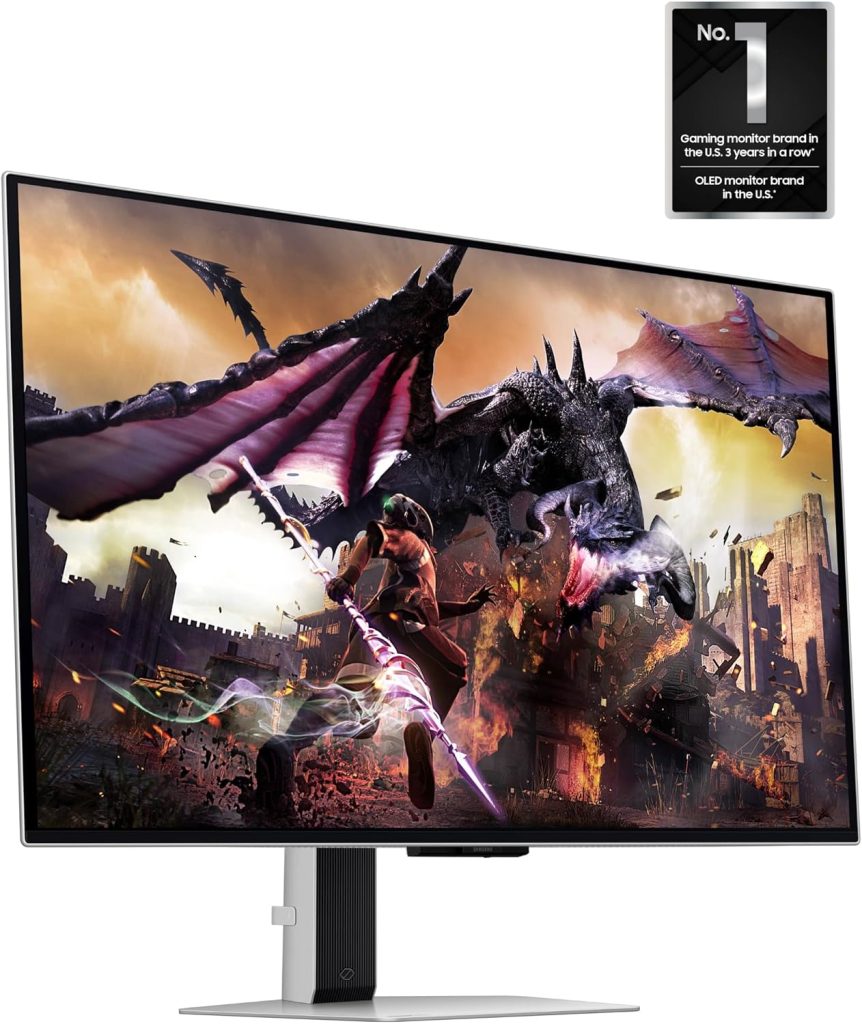
Rating Score: 9.3/10
Product Description
The Samsung Odyssey OLED G8 G80SD takes a slightly different approach.
It’s a 32-inch 4K 240Hz QD-OLED gaming monitor, but Samsung also integrates its smart-TV-style Tizen platform. That means you can access streaming applications and other smart functions without relying entirely on a PC.
The combination is unusual.
You get the pixel density and detail of 4K, the smoothness of 240Hz, OLED contrast, and a matte/glare-free coating that can be useful in brighter rooms.
Independent 2026 testing reports around 1,012 nits peak HDR brightness on a 10% window, alongside 0.03ms-class response and strong color performance.
Amazon-linked U.S. feedback is mixed in an interesting way.
One U.S. verified buyer praised the monitor for PS5 Pro gaming and smart features. Another owner described it as excellent for gaming and praised the color accuracy.
However, some customers strongly dislike the smart interface.
One U.S. reviewer complained that the monitor behaves too much like a television and criticized pop-ups and software behavior. Another customer reported intermittent black-screen problems associated with the display and NVIDIA setup.
That’s a crucial lesson.
The G80SD’s software is either a feature or a nuisance depending on what you want.
If you want a straightforward PC monitor with minimal interface overhead, an ASUS or Alienware may make more sense.
If you like having built-in streaming and smart functionality, however, Samsung’s approach is genuinely useful.
Key Features
- 32-inch screen
- 4K UHD
- QD-OLED
- 240Hz
- 0.03ms-class response
- Matte/glare-free coating
- Samsung Gaming Hub
- Tizen smart platform
- HDMI 2.1
- DisplayPort
- VRR
- HDR
- Built-in smart applications
Amazon User Feedback Summary
Amazon U.S. reviews praise picture quality, OLED contrast, gaming performance, color, and smart functionality.
The most common concerns revolve around the smart software, pop-ups, and occasional connectivity or black-screen reports.
So, while the panel itself is excellent, the software experience deserves consideration.
Pros
PROS
- Excellent 4K OLED image
- 240Hz refresh rate
- Strong HDR
- Great colors
- Matte coating
- Built-in smart functions
- Excellent for console gaming
Cons
CONS
- Smart interface isn’t for everyone
- Reported software/connectivity frustrations
- Premium price
- OLED burn-in consideration
- Can feel more like a TV than a conventional monitor
5. AOC Q27G3XMN — Best Value Mini-LED Gaming Monitor
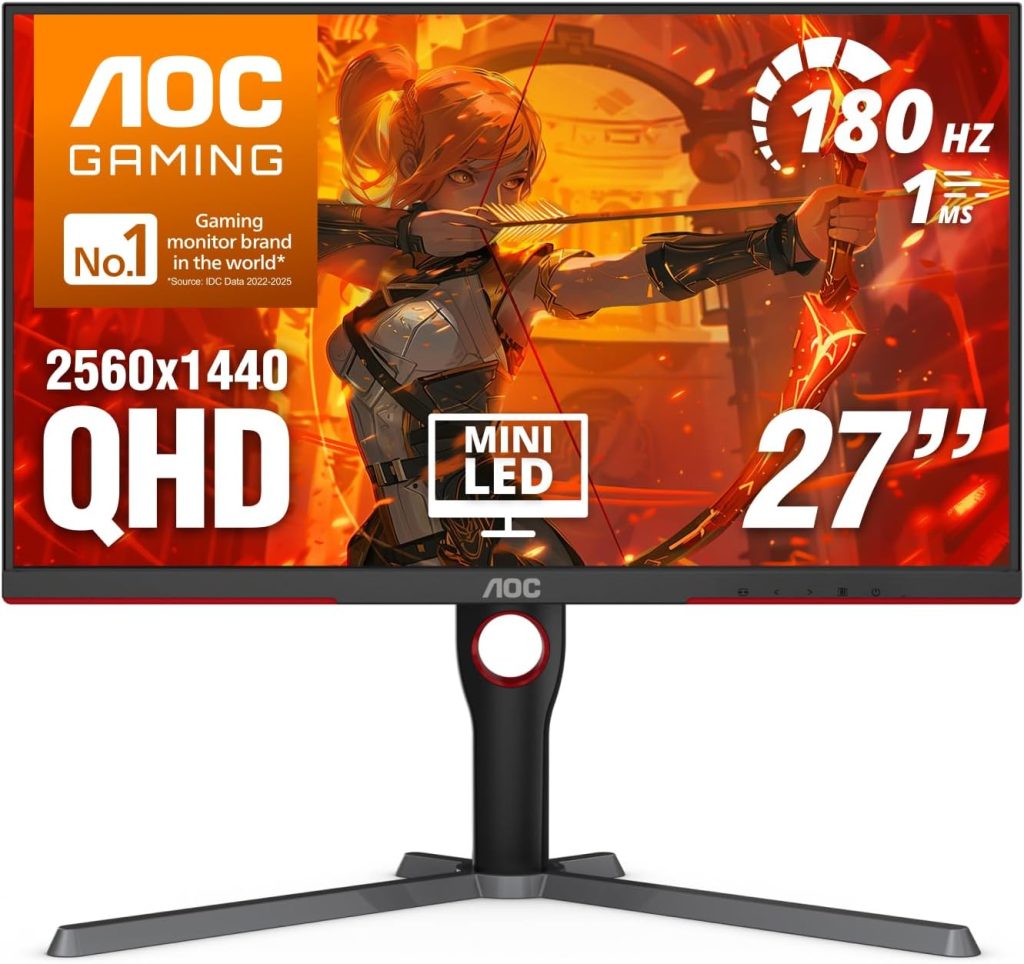
Rating Score: 9.1/10
Product Description
Here’s the surprise of the roundup.
You don’t need an expensive OLED to get excellent gaming image quality.
The AOC Q27G3XMN combines a 27-inch 1440p VA panel with Mini-LED backlighting, 336 local-dimming zones, 180Hz refresh, Adaptive-Sync, and DisplayHDR 1000. RTINGS considers it an impressive budget gaming monitor and particularly praises its HDR performance.
And the Amazon customer feedback is remarkably strong.
Amazon’s current product data shows 4.3/5 from 474 ratings, with 67% five-star and 15% four-star ratings. Customers particularly praise the display quality, refresh rate, and value for money.
More importantly, U.S. reviewers explain why.
One customer described it as a 9.5/10 monitor for gaming and media consumption, praising clarity, color, and the jump from 75Hz to 180Hz. Another U.S. reviewer highlighted the excellent HDR, strong contrast, brightness, and value.
Yet this monitor isn’t perfect.
Because it uses a VA panel, viewing angles aren’t as wide as IPS. RTINGS also reports some black smearing and distracting VRR flicker when frame rates fluctuate.
One Amazon reviewer specifically complained about viewing angles and ultimately questioned its suitability for content creation, although they still considered it an excellent gaming display.
For gaming, though, this is a terrific value.
Key Features
- 27-inch display
- 2560 × 1440
- VA panel
- Mini-LED backlight
- 336 dimming zones
- 180Hz refresh rate
- DisplayHDR 1000
- Adaptive-Sync
- G-SYNC compatible
- Height-adjustable stand
- Pivot/swivel/tilt
- VESA mounting
Amazon User Feedback Summary
This is probably the most compelling Amazon value story in the entire roundup.
Customers praise HDR, contrast, brightness, color, refresh rate, gaming performance, and price.
The complaints are more technical: VA viewing angles, some VRR flicker, black smearing, and occasional quality-control concerns.
Consequently, it’s an excellent recommendation for a gamer who wants impressive HDR without paying OLED prices.
Pros
PROS
- Excellent value
- Mini-LED HDR
- 180Hz
- Strong contrast
- Very bright HDR
- Great gaming image quality
- Excellent ergonomics
- Strong Amazon customer feedback
Cons
CONS
- VA viewing angles
- Some black smearing
- VRR flicker can occur
- No HDMI 2.1
- Not as fast as premium OLEDs
Gaming Monitor Comparison Table
| Model | Rating Score | Size | Resolution | Panel | Refresh | Best For |
|---|---|---|---|---|---|---|
| ASUS ROG Swift PG32UCDM Gen3 | 9.9/10 | 32″ | 4K | QD-OLED | 240Hz | Best overall |
| Alienware AW2725Q | 9.6/10 | 27″ | 4K | QD-OLED | 240Hz | 27″ premium gaming |
| MSI MAG 271QPX QD-OLED | 9.5/10 | 27″ | 1440p | QD-OLED | Up to 360Hz | Competitive FPS |
| Samsung Odyssey G8 G80SD | 9.3/10 | 32″ | 4K | QD-OLED | 240Hz | Smart gaming |
| AOC Q27G3XMN | 9.1/10 | 27″ | 1440p | VA Mini-LED | 180Hz | Best value |
Editorial scores consider gaming performance, image quality, refresh rate, HDR, connectivity, customer feedback, versatility, and 2026 value. They are not Amazon star ratings.
Quick Recommendation
🏆 Best Overall: ASUS ROG Swift OLED PG32UCDM Gen3
If money isn’t a major concern, this is the most complete package. You get 4K, 240Hz, QD-OLED, excellent HDR, HDMI 2.1, DisplayPort 2.1, USB-C 90W, KVM, and advanced OLED protection. RTINGS currently ranks it first among gaming monitors tested in 2026.
🎯 Best 27-Inch 4K: Alienware AW2725Q
Choose this if you want exceptional 4K OLED sharpness but don’t need a 32-inch screen.
⚡ Best Competitive FPS: MSI MAG 271QPX QD-OLED
For esports gaming, 1440p OLED combined with very high refresh rates makes a lot of sense. The Amazon U.S. review signals are also encouraging.
📺 Best Smart Monitor: Samsung Odyssey OLED G8 G80SD
Choose this if you want gaming plus built-in streaming and smart-TV functionality.
💰 Best Value: AOC Q27G3XMN
If you want impressive HDR without spending OLED money, this is the monitor I’d investigate first.
How to Choose the Right Gaming Monitor
The best gaming monitor isn’t necessarily the one with the highest specification.
Instead, start with your games.
Competitive FPS
If you mainly play Counter-Strike, Valorant, Overwatch, Apex Legends, Fortnite, or similar games, prioritize:
- 240Hz or higher
- Excellent motion handling
- Low input lag
- Fast response
- 27-inch size
- 1440p resolution
That’s why the MSI MAG 271QPX is so attractive.
AAA single-player gaming
For Cyberpunk 2077, Starfield, Alan Wake 2, Red Dead Redemption 2, and visually demanding games, 4K OLED makes far more sense.
The ASUS PG32UCDM Gen3 is outstanding here because its 4K resolution and QD-OLED contrast make dark environments and HDR highlights look spectacular.
PS5 Pro and Xbox Series X
Console gamers should prioritize HDMI 2.1.
A 4K 120Hz signal is much more useful than a 360Hz specification that the console can’t exploit.
The ASUS, Alienware, and Samsung models are therefore more attractive for premium console setups.
What about a wireless gaming monitor?
This deserves a straightforward answer.
Can you buy a truly wireless gaming monitor that receives high-refresh-rate 4K video without a cable?
Generally, no—not in the mainstream Amazon gaming-monitor category.
Wireless HDMI solutions exist, but they aren’t the same thing as a monitor having native wireless video capability, and they can introduce bandwidth, latency, compression, or compatibility compromises.
Therefore, if you’re searching Amazon for a wireless gaming monitor, I’d focus on the complete desk setup instead.
Pair the monitor with:
- Wireless gaming mouse
- Wireless gaming keyboard
- Wireless gaming headset
- USB-C docking where appropriate
- Good cable management
- A monitor arm
That can create an almost cable-free gaming desk while retaining a direct video connection for maximum performance.
OLED burn-in: should you worry?
Yes—but don’t panic.
Modern OLED gaming monitors include pixel-shifting, screen-saving, panel-refresh, logo-detection, and other protective technologies.
ASUS, for example, includes OLED Care Pro and a proximity sensor on the PG32UCDM Gen3.
Still, if your monitor will display the same static desktop interface for eight hours every day, OLED requires more consideration than IPS or Mini-LED.
For mixed gaming and general use, OLED is much easier to justify.
Frequently Asked Questions
1. What is the best gaming monitor in 2026?
The ASUS ROG Swift OLED PG32UCDM Gen3 is the strongest overall recommendation in this roundup. RTINGS currently ranks it as the best gaming monitor it has tested, thanks to its 4K resolution, 240Hz refresh rate, QD-OLED panel, excellent HDR, fast response, and modern connectivity.
2. Is a 4K 240Hz gaming monitor worth it?
Yes, if you have a powerful enough gaming PC.
A 4K 240Hz display is excellent for premium gaming, but maintaining 240 FPS at 4K is demanding. If your graphics card can’t approach those frame rates, a 1440p 240Hz monitor may offer better value.
3. Is OLED better than IPS for gaming?
Generally, OLED offers superior contrast, black levels, HDR impact, and response time.
However, IPS can be a better practical choice for heavy desktop use because there’s no OLED burn-in concern and prices are often lower.
4. What is the best budget gaming monitor in this roundup?
The AOC Q27G3XMN.
Its Mini-LED backlight, 180Hz refresh rate, strong contrast, and DisplayHDR 1000 performance make it unusually capable for its class. Amazon customer feedback also strongly praises its value and picture quality.
5. Is the MSI MAG 271QPX good for competitive gaming?
Absolutely.
Its 1440p OLED panel and very high refresh rate make it particularly attractive for fast-paced competitive games. Amazon-linked U.S. reviewers praise its smoothness, colors, responsiveness, and image quality.
6. Which gaming monitor is best for PS5 Pro?
A 4K HDMI 2.1 monitor is the logical choice.
The ASUS PG32UCDM Gen3 is particularly strong because it supports 4K/120Hz console signals and provides excellent HDR.
7. Do gaming monitors have wireless HDMI?
Most mainstream gaming monitors do not have native wireless video transmission.
They generally use HDMI, DisplayPort, or USB-C. Wireless peripherals can make the rest of your gaming setup cable-free, but the monitor normally remains physically connected to the gaming device.
8. Is 180Hz enough for gaming?
Yes.
180Hz is already a substantial upgrade over 60Hz and provides smooth motion. For most gamers, the difference between 180Hz and 240Hz is much smaller than the jump from 60Hz to 144Hz/180Hz.
9. Should I buy a 27-inch or 32-inch gaming monitor?
Choose 27 inches for competitive gaming and desk-space efficiency.
Choose 32 inches for immersion and 4K gaming.
A 32-inch 4K display also gives you a more comfortable viewing area for single-player games and productivity.
10. Is the Samsung Odyssey OLED G8 G80SD good for gaming?
Yes. Its 4K 240Hz QD-OLED panel provides excellent gaming performance, while the smart-TV functionality adds versatility. However, some Amazon U.S. reviewers dislike the software experience and smart features, so it isn’t the ideal choice for someone who wants a simple PC monitor.
11. Which monitor has the best HDR?
Among these five, the ASUS PG32UCDM Gen3 is the strongest premium HDR choice. Its QD-OLED panel provides deep blacks, vivid colors, and bright highlights, and RTINGS currently ranks it highly for HDR gaming.
For a much lower price, however, the AOC Q27G3XMN’s Mini-LED HDR is remarkably good.
Conclusion: Best Gaming Monitor 2026
The gaming-monitor market has reached an interesting point in 2026.
OLED is no longer an exotic technology reserved for enthusiasts. High-refresh 1440p OLED displays are increasingly accessible, while 4K 240Hz OLED monitors have become legitimate premium gaming products.
At the top of the list, the ASUS ROG Swift OLED PG32UCDM Gen3 is the clear all-rounder. Its 32-inch 4K QD-OLED panel, 240Hz refresh rate, HDMI 2.1, DisplayPort 2.1, USB-C 90W, KVM, Dolby Vision, and OLED protection make it exceptionally well-rounded. RTINGS currently ranks it as its best gaming monitor of 2026.
The Alienware AW2725Q takes a different approach. It’s smaller, sharper, and easier to fit into a conventional gaming setup. If 27 inches is your preferred size, it’s a fantastic 4K OLED choice.
For now, don’t let the term send you down the wrong rabbit hole. A high-quality wired HDMI/DisplayPort connection is still the sensible choice for high-refresh gaming. Instead, make the rest of your setup wireless—mouse, keyboard, headset, controller—and use good cable management for the monitor.
After all, the best gaming display isn’t the one with the longest specification sheet.
It’s the one that matches your GPU, your games, your room, your desk, and your budget.